Zen Cart Logo
Forums / Addon Templates / An Upscale Boutique Support Thread

An Upscale Boutique Support Thread

Views: 59,573

Results 121 to 140 of 302
27 Apr 2011, 1:49 PM
#121
shscc avatar

shscc

New Zenner

Join Date:
Apr 2011
Posts:
2
Plugin Contributions:
0

An Upscale Boutique Support Thread

picaflor-azul:

In the admin--tools--layout boxes controller, select the box "sideboxes/search_header.php" make sure that you have set Left/Right Column Status: OFF.

Thanks,

Anne

That is brilliant - all of the fixes have worked straight away!

Many thanks for your help

6 Jun 2011, 6:32 AM
#122
thatsamore avatar

thatsamore

New Zenner

Join Date:
Jun 2011
Posts:
11
Plugin Contributions:
0

Re: An Upscale Boutique Support Thread

Hi all. I'm new to this programming stuff and so don't understand a lot of it. I downloaded ZenCart today through the Fantastico program in HostGator.

I found this template, An Upscale Boutique, which I love and is going to be perfect for my jewelry business. We currently are hosting a very simple one through HostGator and I'm trying to get something more user friendly and professional looking.

The issues I'm having right now are getting a new image put in place of the one that is in the demo. I have one there but can't seem to get it centered on the damask background of the main page. Any advice?

Also, in the beginning of this thread I read about changing the title in the top left area of the page. I'd love to change that to my company name - but don't understand how to. The link provided to the ZenCart Tutorial states:

To change the title text to say what you want, open the includes/languages/english/meta_tags.php file in your text editor. Find the following line of code:

// page title
define('TITLE', 'Zen Cart!');

// Site Tagline
define('SITE_TAGLINE', 'The Art of E-commerce');

I'm having a hard time finding where I make that change. I searched for the file in the "Includes" folder that was downloaded, but can't find it past the 'english' part - meaning I can't find the specific "meta_tags.php" part. Am I not looking in the right place? Is it a change that occurs in the Admin page instead of in the initial files?

Please help. And if this has already been answered in idiot terms (since that's clearly the level I'm at with this stuff!) - please direct me where that's already occurred.

Thank you so much for your help - and for making such a great template.

Erika

6 Jun 2011, 1:03 PM
#123
picaflor_azul avatar

picaflor_azul

Totally Zenned

Join Date:
Jul 2009
Location:
picaflor-azul.com
Posts:
6,940
Plugin Contributions:
28

Re: An Upscale Boutique Support Thread

Erica,

It is best if you read the install.txt file and follow the instructions for customizing the template there. The answers to all of your questions are in the install.txt file.

Thanks,

Anne

6 Jun 2011, 7:17 PM
#124
thatsamore avatar

thatsamore

New Zenner

Join Date:
Jun 2011
Posts:
11
Plugin Contributions:
0

Re: An Upscale Boutique Support Thread

picaflor-azul:

Erica,

It is best if you read the install.txt file and follow the instructions for customizing the template there. The answers to all of your questions are in the install.txt file.

Thanks,

Anne

Thanks. I'm reading through it and am not sure what to do at this point:

To make your site look exactly like the demo:

A.  In your Zen Cart admin:

Go to "Configuration" then "Product Listing"

Copy the values from:

http://www.picaflor-azul.com/free-demos-2/includes/templates/an_upscale_boutique/images/product-listing.png

Copy the values from/to what?
I'm not understanding where we past the - http://www.picaflour-azul....etc. Or do we copy/paste the link on our page into the read me file...?

Sorry - like I said. I'm an idiot when it comes to this stuff.

Thanks, Erika

6 Jun 2011, 9:13 PM
#125
picaflor_azul avatar

picaflor_azul

Totally Zenned

Join Date:
Jul 2009
Location:
picaflor-azul.com
Posts:
6,940
Plugin Contributions:
28

Re: An Upscale Boutique Support Thread

Erika,

You need to do what the instructions are telling you to do. Go to your zen cart admin--configuration--product listing. Then open up the image in your browser. Then copy the settings from the image to your zen cart admin.

Thanks,

Anne

6 Jun 2011, 9:34 PM
#126
thatsamore avatar

thatsamore

New Zenner

Join Date:
Jun 2011
Posts:
11
Plugin Contributions:
0

Re: An Upscale Boutique Support Thread

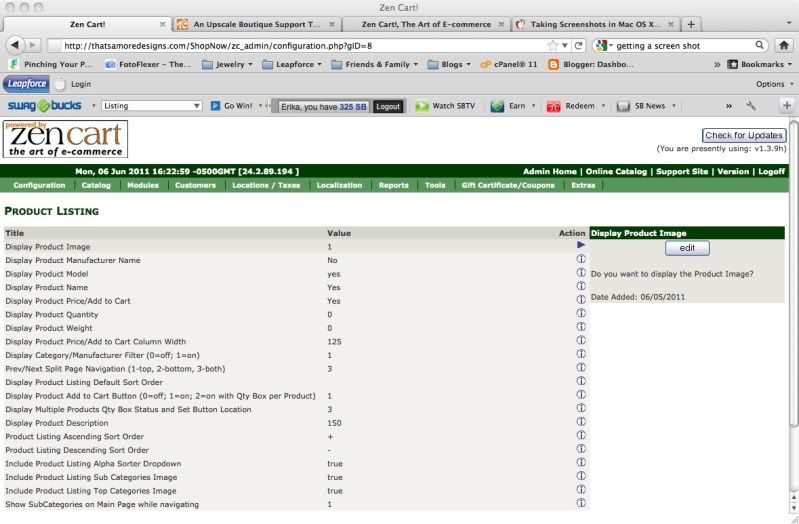
I guess this is where I'm lost. When I go into the ZenCart Admin - Configuration - Product Listing - I'm not seeing any place to put any links or settings other than the fixed ones they have to choose from.

This is the screen I see when I go into the Admin - Configuration - Product Listing:

Or am I not understanding where I'm supposed to be? Is in the Admin info through their webpage - or am I supposed to be making these changes in the files I loaded to my computer?

6 Jun 2011, 11:02 PM
#127
thatsamore avatar

thatsamore

New Zenner

Join Date:
Jun 2011
Posts:
11
Plugin Contributions:
0

Re: An Upscale Boutique Support Thread

picaflor-azul:

Erika,

You need to do what the instructions are telling you to do. Go to your zen cart admin--configuration--product listing. Then open up the image in your browser. Then copy the settings from the image to your zen cart admin.

Thanks,

Anne

Oh also - if you're meaning open the link that's listed in the install.txt info - this link: "http://www.picaflor-azul.com/free-demos-2/includes/templates/an_upscale_boutique/images/product-listing.png" has a 404 error when I try and open it.

7 Jun 2011, 4:47 AM
#129
thatsamore avatar

thatsamore

New Zenner

Join Date:
Jun 2011
Posts:
11
Plugin Contributions:
0

Re: An Upscale Boutique Support Thread

Thanks for that corrected code. The others listed in that section (Steps B & C) are having the same issues.

7 Jun 2011, 5:05 AM
#130
thatsamore avatar

thatsamore

New Zenner

Join Date:
Jun 2011
Posts:
11
Plugin Contributions:
0

Re: An Upscale Boutique Support Thread

Nevermind. I figured out how to get the correct info for this.

7 Jun 2011, 5:47 AM
#131
thatsamore avatar

thatsamore

New Zenner

Join Date:
Jun 2011
Posts:
11
Plugin Contributions:
0

Re: An Upscale Boutique Support Thread

Okay - another question. :) Sorry. And thank yo so much for all your help.

The part where we edit the stylesheet settings. It states to un-comment some parts. From what I've read uncommenting would mean to remove the "/..../" from the line. The ones that state to remove those parts do not have them. Has that been changed so we no longer need to do this step?

Also - for Step 5. Is the email listed the best one to use in order to contact you about getting a logo that looks like the one on the page? And is that the same email for donations?

I really appreciate all your help. I'm sure you get tired of answering the same things over and over - especially when you have to dumb things down for novices like me!

7 Jun 2011, 1:28 PM
#132
picaflor_azul avatar

picaflor_azul

Totally Zenned

Join Date:
Jul 2009
Location:
picaflor-azul.com
Posts:
6,940
Plugin Contributions:
28

Re: An Upscale Boutique Support Thread

Thanks for that corrected code. The others listed in that section (Steps B & C) are having the same issues.

The links to the 3 images are:

Product Listing

Poduct Info

Layout Settings

Thanks,

Anne

7 Jun 2011, 1:30 PM
#133
picaflor_azul avatar

picaflor_azul

Totally Zenned

Join Date:
Jul 2009
Location:
picaflor-azul.com
Posts:
6,940
Plugin Contributions:
28

Re: An Upscale Boutique Support Thread

Okay - another question. :) Sorry. And thank yo so much for all your help.

The part where we edit the stylesheet settings. It states to un-comment some parts. From what I've read uncommenting would mean to remove the "/..../" from the line. The ones that state to remove those parts do not have them. Has that been changed so we no longer need to do this step?

Also - for Step 5. Is the email listed the best one to use in order to contact you about getting a logo that looks like the one on the page? And is that the same email for donations?

I really appreciate all your help. I'm sure you get tired of answering the same things over and over - especially when you have to dumb things down for novices like me!

Please post a link to your site so that I can take a look.

Thanks,

Anne

7 Jun 2011, 3:00 PM
#134
hara avatar

hara

Zen Follower

Join Date:
Sep 2008
Posts:
397
Plugin Contributions:
0

Re: An Upscale Boutique Support Thread

Is your free templates fully compatible with latest version 1.3.9h?

7 Jun 2011, 4:10 PM
#136
picaflor_azul avatar

picaflor_azul

Totally Zenned

Join Date:
Jul 2009
Location:
picaflor-azul.com
Posts:
6,940
Plugin Contributions:
28

Re: An Upscale Boutique Support Thread

Is your free templates fully compatible with latest version 1.3.9h?

Yes, all of our templates are compatible with 1.3.9h.

Thanks,

Anne

7 Jun 2011, 4:57 PM
#137
thatsamore avatar

thatsamore

New Zenner

Join Date:
Jun 2011
Posts:
11
Plugin Contributions:
0

Re: An Upscale Boutique Support Thread

How does one back up files in code? (Like step 6 describes - if we choose to change the text via the ZenCart Admin).

7 Jun 2011, 5:03 PM
#138
picaflor_azul avatar

picaflor_azul

Totally Zenned

Join Date:
Jul 2009
Location:
picaflor-azul.com
Posts:
6,940
Plugin Contributions:
28

Re: An Upscale Boutique Support Thread

The part where we edit the stylesheet settings. It states to un-comment some parts. From what I've read uncommenting would mean to remove the "/..../" from the line. The ones that state to remove those parts do not have them. Has that been changed so we no longer need to do this step?

I think that you are talking about this:

Stylesheet Settings (/includes/templates/an_upscale_boutique/css/stylesheet.css):

The top horizontal category navigation is set to display none by default.
To use comment out this declaration in /includes/templates/an_upscale_boutique/css/stylesheet.css:

#navCatTabsWrapper {
        display: none;
        }

and un-comment the following declarations:


/*#navCatTabs ul  {
        margin: 0;
        padding:  0.5em 0em;
        list-style-type: none;
        text-align: center;
        line-height: 1.5em;
        }
#navCatTabs ul li {display: inline;}
#navCatTabs ul li a {
        text-decoration: none;
        padding: 0em 0.5em;
        margin: 0;
        color: #523813;
        white-space: nowrap;
        }*/

You will not see the top category navigation until you add categories. If you want them to show, you should follow these instructions. If you do not want them to show, then you need to do nothing.

Thanks,

Anne

7 Jun 2011, 5:05 PM
#139
picaflor_azul avatar

picaflor_azul

Totally Zenned

Join Date:
Jul 2009
Location:
picaflor-azul.com
Posts:
6,940
Plugin Contributions:
28

Re: An Upscale Boutique Support Thread

How does one back up files in code? (Like step 6 describes - if we choose to change the text via the ZenCart Admin).

Copying the files to your computer would be a good way to back them up in case you need to restore them.

Thanks,

Anne

7 Jun 2011, 5:33 PM
#140
thatsamore avatar

thatsamore

New Zenner

Join Date:
Jun 2011
Posts:
11
Plugin Contributions:
0

Re: An Upscale Boutique Support Thread

picaflor-azul:

You will not see the top category navigation until you add categories. If you want them to show, you should follow these instructions. If you do not want them to show, then you need to do nothing.

Thanks,

Anne

Top category navigation would be above the photo on the main page? Or are those the ones right below the picture?