Forums / All Other Contributions/Addons / Image Handler 4 (for v1.5.x) Support Thread

Image Handler 4 (for v1.5.x) Support Thread

Views: 344,245

Results 121 to 140 of 1,691
3 May 2012, 4:13 AM
#121
divavocals avatar

divavocals

Totally Zenned

Join Date:
Jan 2007
Location:
Los Angeles, California, United States
Posts:
10,011
Plugin Contributions:
3

Image Handler 4 (for v1.5.x) Support Thread

algerdes:

If I may, just one question:

In the installation directions, this stuck out for me:

*Image Handler 4 enables you to use **GD libraries or ImageMagick *(if installed on your server) to generate and resize small, medium and large images on the fly on page request.

Now I don't know if either of these are loaded. If they do not exist does that mean that IH4 isn't doing anything in the way of "generate and resize... on the fly"? Also, if they do not exist, and are needed, where does one find them?

Thanks
I look forward to your replies!

ALG

BTW, So far this mod is looking exactly like what we need, and not a moment too soon either. Thank You to all that worked on it and made it happen.

ALGYour web host would tell you which of these libraries is installed..

My Site - Zen Cart & WordPress integration specialist
I don't answer support questions via PM. Post add-on support questions in the support thread. The question & the answer will benefit others with similar issues.

3 May 2012, 10:34 AM
#122
limelites avatar

limelites

Totally Zenned

Join Date:
Jan 2009
Posts:
2,085
Plugin Contributions:
0

Re: Image Handler 4 (for v1.5.x) Support Thread

I'm usually pretty good at installing mods and this one seems so simple to install. I can't get it to work though. I've tried and re-tried and re-tried following the readme to the letter.

It's a new site we're building at wholesale.silkblooms.co.uk Could you please take a look at this product for example:

http://wholesale.silkblooms.co.uk/index.php?main_page=product_info&cPath=2_64_353&products_id=86

Everything works, except for the click to enlarge function. Click to enlarge and it just goes onto a never ending loading.gif

Does anyone have any idea what's causing this?

Zen Cart V1.5
IH V4

3 May 2012, 1:20 PM
#123
divavocals avatar

divavocals

Totally Zenned

Join Date:
Jan 2007
Location:
Los Angeles, California, United States
Posts:
10,011
Plugin Contributions:
3

Re: Image Handler 4 (for v1.5.x) Support Thread

limelites:

I'm usually pretty good at installing mods and this one seems so simple to install. I can't get it to work though. I've tried and re-tried and re-tried following the readme to the letter.

It's a new site we're building at wholesale.silkblooms.co.uk Could you please take a look at this product for example:

http://wholesale.silkblooms.co.uk/index.php?main_page=product_info&cPath=2_64_353&products_id=86

Everything works, except for the click to enlarge function. Click to enlarge and it just goes onto a never ending loading.gif

Does anyone have any idea what's causing this?

Zen Cart V1.5
IH V4Sorry to say, but this is not caused by IH4. Whatever lightbox came with your Template Monstrosity template is the issue and the cause of the never ending loading.gif..

My Site - Zen Cart & WordPress integration specialist
I don't answer support questions via PM. Post add-on support questions in the support thread. The question & the answer will benefit others with similar issues.

3 May 2012, 1:38 PM
#124
limelites avatar

limelites

Totally Zenned

Join Date:
Jan 2009
Posts:
2,085
Plugin Contributions:
0

Re: Image Handler 4 (for v1.5.x) Support Thread

DivaVocals:

Sorry to say, but this is not caused by IH4. Whatever lightbox came with your Template Monstrosity template is the issue and the cause of the never ending loading.gif..

Yup, that's what I though it was to do with the template. I'll have to put this out to freelancers I think. I really NEED IH4 to work, it's the best!

3 May 2012, 1:41 PM
#125
divavocals avatar

divavocals

Totally Zenned

Join Date:
Jan 2007
Location:
Los Angeles, California, United States
Posts:
10,011
Plugin Contributions:
3

Re: Image Handler 4 (for v1.5.x) Support Thread

limelites:

Yup, that's what I though it was to do with the template. I'll have to put this out to freelancers I think. I really NEED IH4 to work, it's the best!
Why not go back to Template Monstrosity and have them fix their template??? (something they always seem LOATHE to do:shocking:) OR better yet, find out from them how you can REMOVE their funky lightbox and install Zen Lightbox which DOES work with IH4

My Site - Zen Cart & WordPress integration specialist
I don't answer support questions via PM. Post add-on support questions in the support thread. The question & the answer will benefit others with similar issues.
3 May 2012, 2:08 PM
#126
limelites avatar

limelites

Totally Zenned

Join Date:
Jan 2009
Posts:
2,085
Plugin Contributions:
0

Re: Image Handler 4 (for v1.5.x) Support Thread

I purchased this from a 3rd party, but I'll contact them. I don't hold out much hope for support from them but I do like the look of the template so if they can't help then I'll put it out to freelance. Now that I know exactly what's required, I'll at least be able to put it to tender in a concise and well informed manner. Thank you for your help. Hopefully a freelancer will be able to modify the Lightbox to work correctly.

I've also noticed that the Image Settings seem to have no effect on the dimensions of the small images, so this will be an add-on to the freelance project :)

3 May 2012, 2:59 PM
#127
divavocals avatar

divavocals

Totally Zenned

Join Date:
Jan 2007
Location:
Los Angeles, California, United States
Posts:
10,011
Plugin Contributions:
3

Re: Image Handler 4 (for v1.5.x) Support Thread

limelites:

I purchased this from a 3rd party, but I'll contact them. I don't hold out much hope for support from them but I do like the look of the template so if they can't help then I'll put it out to freelance. Now that I know exactly what's required, I'll at least be able to put it to tender in a concise and well informed manner. Thank you for your help. Hopefully a freelancer will be able to modify the Lightbox to work correctly.

I've also noticed that the Image Settings seem to have no effect on the dimensions of the small images, so this will be an add-on to the freelance project :)The only way this would be the case is if the template has removed or modified Zen Cart's built in image features which IH4 needs to work properly.. I would suggest that versus having your freelancer "fix" this template that you have them simply recreate this template the correct way sans all of the slash and burn coding techniques that Template Monstrosity templates all seem to employ in all of it's templates..

My Site - Zen Cart & WordPress integration specialist
I don't answer support questions via PM. Post add-on support questions in the support thread. The question & the answer will benefit others with similar issues.

3 May 2012, 3:02 PM
#128
algerdes avatar

algerdes

New Zenner

Join Date:
Apr 2012
Location:
Lebanon, Illinois
Posts:
27
Plugin Contributions:
0

Re: Image Handler 4 (for v1.5.x) Support Thread

Sorry, but I think I did not communicate correctly. (Happens when I stay up past my bed time.)
What I am actually asking is are either of these REQUIRED to make IH4 fully functional?

3 May 2012, 3:05 PM
#129
divavocals avatar

divavocals

Totally Zenned

Join Date:
Jan 2007
Location:
Los Angeles, California, United States
Posts:
10,011
Plugin Contributions:
3

Re: Image Handler 4 (for v1.5.x) Support Thread

algerdes:

Sorry, but I think I did not communicate correctly. (Happens when I stay up past my bed time.)
What I am actually asking is are either of these REQUIRED to make IH4 fully functional?Yes........

My Site - Zen Cart & WordPress integration specialist
I don't answer support questions via PM. Post add-on support questions in the support thread. The question & the answer will benefit others with similar issues.

3 May 2012, 3:26 PM
#130
algerdes avatar

algerdes

New Zenner

Join Date:
Apr 2012
Location:
Lebanon, Illinois
Posts:
27
Plugin Contributions:
0

Re: Image Handler 4 (for v1.5.x) Support Thread

Thank you. I just verified with the host that GD Libraries are available. Installation on the main site will commence after I've refilled my "water" glass. 8=)

3 May 2012, 3:33 PM
#131
thebigkick avatar

thebigkick

New Zenner

Join Date:
Jan 2012
Location:
Montreal
Posts:
84
Plugin Contributions:
0

Re: Image Handler 4 (for v1.5.x) Support Thread

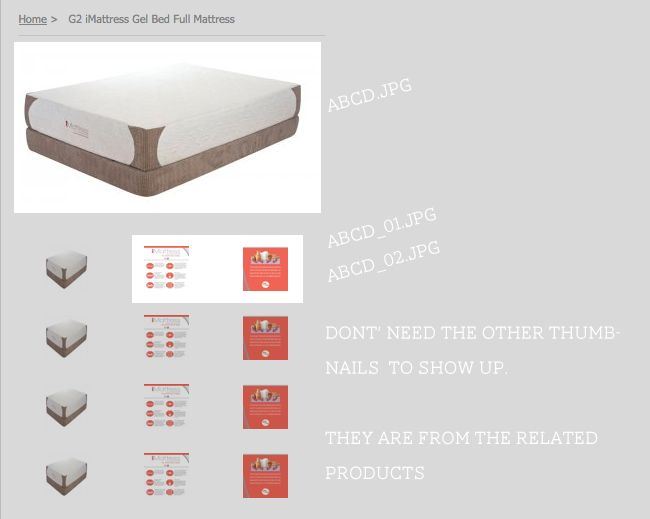
I followed the naming convention for uploading multiple images (abcd.jpg, abcd_01.jpg, abcd_03.jpg). It worked for the most part except that it is showing the main image as a thumbnail AND displaying other images as thumbanails as well. I'm confused why. Here is a screen.

Thanks

3 May 2012, 3:43 PM
#132
thebigkick avatar

thebigkick

New Zenner

Join Date:
Jan 2012
Location:
Montreal
Posts:
84
Plugin Contributions:
0

Re: Image Handler 4 (for v1.5.x) Support Thread

I solved it, nevermind. I had to delete the old image that was being used.

3 May 2012, 3:58 PM
#133
divavocals avatar

divavocals

Totally Zenned

Join Date:
Jan 2007
Location:
Los Angeles, California, United States
Posts:
10,011
Plugin Contributions:
3

Re: Image Handler 4 (for v1.5.x) Support Thread

thebigkick:

I solved it, nevermind. I had to delete the old image that was being used.Not totally an IH4 issue (it's default Zen Cart image management). Glad you got it resolved anyhow... for the record.. we need a URL to help.. screeprints don't let us REALLY see things..

My Site - Zen Cart & WordPress integration specialist
I don't answer support questions via PM. Post add-on support questions in the support thread. The question & the answer will benefit others with similar issues.

3 May 2012, 7:32 PM
#134
mcgill avatar

mcgill

Zen Follower

Join Date:
Aug 2005
Posts:
101
Plugin Contributions:
0

Re: Image Handler 4 (for v1.5.x) Support Thread

Hi
just installed this plugin and it works fine. Only one problem is it disabled the "Status" button on ads. Have i missed something is it a bug or is that normal?

Only a fool say's money doesn't matter. No rich man ever starved to death.

3 May 2012, 7:58 PM
#135
divavocals avatar

divavocals

Totally Zenned

Join Date:
Jan 2007
Location:
Los Angeles, California, United States
Posts:
10,011
Plugin Contributions:
3

Re: Image Handler 4 (for v1.5.x) Support Thread

McGill:

Hi
just installed this plugin and it works fine. Only one problem is it disabled the "Status" button on ads. Have i missed something is it a bug or is that normal?As far as I know it's unrelated.. None of the IH4 files or DB changes would affect banners (I assume when you say ads, you mean the Zen Cart banners)

My Site - Zen Cart & WordPress integration specialist
I don't answer support questions via PM. Post add-on support questions in the support thread. The question & the answer will benefit others with similar issues.

4 May 2012, 4:51 AM
#136
mcgill avatar

mcgill

Zen Follower

Join Date:
Aug 2005
Posts:
101
Plugin Contributions:
0

Re: Image Handler 4 (for v1.5.x) Support Thread

What I mean is in admin where the products are listed. The status on/off (green/red) button. It is image handler that causes the problem because when I uninstall it it works fine

Only a fool say's money doesn't matter. No rich man ever starved to death.

4 May 2012, 5:56 AM
#137
divavocals avatar

divavocals

Totally Zenned

Join Date:
Jan 2007
Location:
Los Angeles, California, United States
Posts:
10,011
Plugin Contributions:
3

Re: Image Handler 4 (for v1.5.x) Support Thread

McGill:

What I mean is in admin where the products are listed. The status on/off (green/red) button. It is image handler that causes the problem because when I uninstall it it works fine

Well that was NOT clear from you earlier post. Also if you search through the support thread this issue has been identified, a solution has been posted and it will be addressed in the next release..

My Site - Zen Cart & WordPress integration specialist
I don't answer support questions via PM. Post add-on support questions in the support thread. The question & the answer will benefit others with similar issues.

4 May 2012, 8:44 PM
#138
nitelite avatar

nitelite

New Zenner

Join Date:
May 2012
Posts:
2
Plugin Contributions:
0

Re: Image Handler 4 (for v1.5.x) Support Thread

Hi.

I have installed IH4 to my zen cart shop, server has imagemagic installed.
I followed the instruction manual to the letter, but when every file is in place and I try to enter the admin area I get this error:
WARNING: An Error occurred, please refresh the page and try again.

Refreshing page does not help, and I am unable to enter my admin area.

Removing the files in admin/includes/languages/english/extra_definitions grants me access to my admin area again, but with the
following installation error:
Missing or unreadable file:/home/3/f/fpvshop/www/shop/hemmelig/includes/languages/english/extra_definitions/bmz_image_handler.php
Missing or unreadable file:/home/3/f/fpvshop/www/shop/hemmelig/includes/languages/english/extra_definitions/bmz_language_admin.php
Some Image Handler files do not exist. Perhaps you have uploaded them incorrectly? Or the permissions are set incorrectly?
********** Installation has been aborted. **********

I am running a custom template (shouldnt matter) and norwegian language. (I made a copy of the english folder in admin and renamed it norwegian).

Any tips? thanks

5 May 2012, 1:23 PM
#139
nitelite avatar

nitelite

New Zenner

Join Date:
May 2012
Posts:
2
Plugin Contributions:
0

Re: Image Handler 4 (for v1.5.x) Support Thread

getting this error out from debug in cache folder:

PHP Fatal error: 1064:You have an error in your SQL syntax; check the manual that corresponds to your MySQL server version for the right syntax to use near ' 1001, now(), now(), NULL, 'zen_cfg_select_option(array(''yes'',''no''),')' at line 1 :: INSERT INTO configuration (configuration_id, configuration_title, configuration_key, configuration_value, configuration_description, configuration_group_id, sort_order, last_modified, date_added, use_function, set_function) VALUES (NULL, 'IH resize images', 'IH_RESIZE', 'no', 'Select either -no- which is old Zen-Cart behaviour or -yes- to activate automatic resizing and caching of images. --Note: If you select -no-, all of the Image Handler specific image settings will be unavailable including: image filetype selection, background colors, compression, image hover, and watermarking-- If you want to use ImageMagick you have to specify the location of the <strong>convert</strong> binary in <em>includes/extra_configures/bmz_image_handler_conf.php</em>.', , 1001, now(), now(), NULL, 'zen_cfg_select_option(array(''yes'',''no''),') in /home/3/f/fpvshop/www/shop/includes/classes/db/mysql/query_factory.php on line 101

5 May 2012, 5:53 PM
#140
kernheimer avatar

kernheimer

Zen Follower

Join Date:
Jul 2009
Posts:
126
Plugin Contributions:
0

Re: Image Handler 4 (for v1.5.x) Support Thread

Great.. i love IH.. but can't get it to install.. admin keeps saying: Missing or unreadable file:/var/www/vhosts/cameleonpaint.com/httpdocs/shop/bmz_cache/.htaccess
and where ever i look, cant find that htaccess..
is that my bad? im on a mac?