Forums / Templates, Stylesheets, Page Layout / Responsive Classic (built in to Zen Cart v1.5.5) [Support Thread]

Responsive Classic (built in to Zen Cart v1.5.5) [Support Thread]

Sticky

Started by picaflor_azul on 16 Mar 2016, 11:30 PM · Views: 363,092

Results 681 to 700 of 1,106
29 Jan 2019, 1:19 PM
#681
heresy_miniatures avatar

heresy_miniatures

New Zenner

Join Date:
Jul 2011
Posts:
59
Plugin Contributions:
0

Responsive Classic (built in to Zen Cart v1.5.5) [Support Thread]

Should I ask about v156a responsive classic in this thread or start a new one?

Here is my question, in case it's this thread:

Hi, replacing my 1.5.4 site with 1.5.6a, and have noticed that on the desktop and mobile versions there is no search bar for my customers to quickly find what they are after.
How do i activate or insert a search function into the top bar, particularly on mobile? I can see the code in the responsive_mobile.css file:

/*bof header*/
/*top search*/
#navMainSearch{display:none;visibility:hidden;}
#navMainSearch1{float:none;text-align:center;padding:10px 0;margin:0;width:100%!important;background:#666;}
#navMainSearch1 input[type=text]{vertical-align:top;display:inline-block;border:0;width:65% !important;height:32px;margin:0;font-size:0.9em;-moz-box-sizing: border-box; -webkit-box-sizing: border-box; box-sizing: border-box;}
#navMainSearch1 input[type=submit]{-moz-box-sizing: border-box; -webkit-box-sizing: border-box; box-sizing: border-box;display:inline-block;margin:0;height:32px;}
/*search in mobile menu*/
#menu-search{padding:10px 0;margin-left:20px;}
#menu-search input[type=text]{vertical-align:top;display:inline-block;border:0;width:48% !important;height:32px;margin:0;font-size:0.9em;-moz-box-sizing: border-box; -webkit-box-sizing: border-box; box-sizing: border-box;}
#menu-search input[type=submit]{-moz-box-sizing: border-box; -webkit-box-sizing: border-box; box-sizing: border-box;display:inline-block;margin:0;height:32px;}
/*top navigation*/

but can't seem to work out which bits will bring the search function back to my site, (it's crucial).

this is the test site (also, when I try to switch it into showcase mode the admin page freaks out and gives error codes, so please don't attempt to actually pay for anything!)
http:https://www.heresyminiatures.com/shop156/
**
Second question: my server is running old php 5.4 or something, when I switch it to 7.x do I need to upload the database copy again and run zc_install? is that correct?**

I trawled this thread for an hour and a half looking for an answer to the Search button/bar/icon question and couldn't find it or missed it if it was given, apologies if so.

29 Jan 2019, 3:40 PM
#682
linuxguy2 avatar

linuxguy2

Zen Follower

Join Date:
Sep 2013
Location:
Texas
Posts:
315
Plugin Contributions:
0

Re: Responsive Classic (built in to Zen Cart v1.5.5) [Support Thread]

Heresy Miniatures:

Should I ask about v156a responsive classic in this thread or start a new one?

Here is my question, in case it's this thread:

Hi, replacing my 1.5.4 site with 1.5.6a, and have noticed that on the desktop and mobile versions there is no search bar for my customers to quickly find what they are after.
How do i activate or insert a search function into the top bar, particularly on mobile? I can see the code in the responsive_mobile.css file:

/bof header/
/top search/
#navMainSearch{display:none;visibility:hidden;}
#navMainSearch1{float:none;text-align:center;padding:10px 0;margin:0;width:100%!important;background:#666;}
#navMainSearch1 input[type=text]{vertical-align:top;display:inline-block;border:0;width:65% !important;height:32px;margin:0;font-size:0.9em;-moz-box-sizing: border-box; -webkit-box-sizing: border-box; box-sizing: border-box;}
#navMainSearch1 input[type=submit]{-moz-box-sizing: border-box; -webkit-box-sizing: border-box; box-sizing: border-box;display:inline-block;margin:0;height:32px;}
/search in mobile menu/
#menu-search{padding:10px 0;margin-left:20px;}
#menu-search input[type=text]{vertical-align:top;display:inline-block;border:0;width:48% !important;height:32px;margin:0;font-size:0.9em;-moz-box-sizing: border-box; -webkit-box-sizing: border-box; box-sizing: border-box;}
#menu-search input[type=submit]{-moz-box-sizing: border-box; -webkit-box-sizing: border-box; box-sizing: border-box;display:inline-block;margin:0;height:32px;}
/top navigation/

> 
> but can't seem to work out which bits will bring the search function back to my site, (it's crucial). 
> 
> this is the test site (also, when I try to switch it into showcase mode the admin page freaks out and gives error codes, so please don't attempt to actually pay for anything!)
> http:<https://www.heresyminiatures.com/shop156/>
> **
> Second question: my server is running old php 5.4 or something, when I switch it to 7.x do I need to upload the database copy again and run zc_install? is that correct?**
> 
> I trawled this thread for an hour and a half looking for an answer to the Search button/bar/icon question and couldn't find it or missed it if it was given, apologies if so.

Are you running any plugins?
What database engine is your host running.
try switching to php 7.2 and see if your errors go away.
You can always switch back.

No, Just switch to php 7.2.
If you run zc_install it will over write your database
29 Jan 2019, 3:51 PM
#683
linuxguy2 avatar

linuxguy2

Zen Follower

Join Date:
Sep 2013
Location:
Texas
Posts:
315
Plugin Contributions:
0

Re: Responsive Classic (built in to Zen Cart v1.5.5) [Support Thread]

The search functions are controlled in Admin > Tools > Layout Boxes Controller

29 Jan 2019, 5:35 PM
#684
heresy_miniatures avatar

heresy_miniatures

New Zenner

Join Date:
Jul 2011
Posts:
59
Plugin Contributions:
0

Re: Responsive Classic (built in to Zen Cart v1.5.5) [Support Thread]

linuxguy2:

Are you running any plugins?
What database engine is your host running.
try switching to php 7.2 and see if your errors go away.
You can always switch back.

No, Just switch to php 7.2.
If you run zc_install it will over write your database

No plug ins yet, it's a clean install and I have yet to see any plug ins that are markesd as 1.5.6a friendly so I'm reluctant to install much yet. My previous shop got a bit over-indulged in that regard. Hopefully reward suite and edit orders will work with 1.5.6 .Thanks for the php answer! And thanks fo rthe search answer, can't believe I missed that. So busy assuming it must be coding that the obvious answer was hidden to my eyes...

3 Feb 2019, 10:40 PM
#685
sliderco avatar

sliderco

New Zenner

Join Date:
Feb 2018
Location:
Lafayette, CO
Posts:
5
Plugin Contributions:
0

Re: Responsive Classic (built in to Zen Cart v1.5.5) [Support Thread]

How can I add EZ Pages to the 'Information' menu?

I have edited the title of the Information sidebox to read 'Main Menu' and I would like to add my EZ Page to that menu.

I suppose I could go the other way and create EZ Pages with relative links to each page then hide the 'Information' menu. Which I might do anyway so that I can use the top feature of EZ Pages as a horizontal menu.

Here is the site: https://www.paintingbarn.com - We have several more paintings/products but I haven't migrated them over to this new installation of ZC yet.

I was forced to upgrade from the previous site which used Drupal for the front door presentation but my Drupal install couldn't function on the newer 7.2 version of PHP. So rather than rebuild the Drupal/Zen Cart combination, I have installed a new version of ZC and will now use it for all pages. You'll see the Calendar page (CSS is yet to be polished) which is one of a few custom pages that will need to be added.

Thanks in advance!

1 Mar 2019, 2:49 PM
#686
adb34 avatar

adb34

Totally Zenned

Join Date:
Mar 2008
Location:
Brampton, Cumbria, United Kingdom, United Kingdom
Posts:
825
Plugin Contributions:
0

Re: Responsive Classic (built in to Zen Cart v1.5.5) [Support Thread]

I am using v1.5.5f as I am using the plugin bookx which currently does not work with v1.5.6a. Some of the plugins are asking to merge with file located in the template for the store, however, when I search for the file it is not there, it is in the template default folder. Do I merge the file in the default file and up load a copy into responsive classic?

Learning Fast.
Eden Craft Supplies

1 Mar 2019, 4:58 PM
#687
linuxguy2 avatar

linuxguy2

Zen Follower

Join Date:
Sep 2013
Location:
Texas
Posts:
315
Plugin Contributions:
0

Re: Responsive Classic (built in to Zen Cart v1.5.5) [Support Thread]

adb34:

I am using v1.5.5f as I am using the plugin bookx which currently does not work with v1.5.6a. Some of the plugins are asking to merge with file located in the template for the store, however, when I search for the file it is not there, it is in the template default folder. Do I merge the file in the default file and up load a copy into responsive classic?

Based on my experience that should work.

In the forum of that plugin I would point out that it needs an update to 1.5.6a

However when you are making several mods one should be aware of this information.
https://www.zen-cart.com/content.php?228-understanding-the-override-system
https://www.zen-cart.com/content.php?180-how-do-i-create-a-new-custom-template

HINT:
To keep track of the files I change I also include a copy of the original file in the folder where I've merged or copied that file and add .ORG after the .php extension.
ZC ignores those files [Example] file_name.php.ORG but they are handy for your reference.
I also add notations at the top of the file I've modified.
This has saved me hours of debug when I make changes or upgrade.

2 Mar 2019, 12:51 PM
#688
adb34 avatar

adb34

Totally Zenned

Join Date:
Mar 2008
Location:
Brampton, Cumbria, United Kingdom, United Kingdom
Posts:
825
Plugin Contributions:
0

Re: Responsive Classic (built in to Zen Cart v1.5.5) [Support Thread]

linuxguy2:

Based on my experience that should work.

In the forum of that plugin I would point out that it needs an update to 1.5.6a

However when you are making several mods one should be aware of this information.
https://www.zen-cart.com/content.php?228-understanding-the-override-system
https://www.zen-cart.com/content.php?180-how-do-i-create-a-new-custom-template

HINT:
To keep track of the files I change I also include a copy of the original file in the folder where I've merged or copied that file and add .ORG after the .php extension.
ZC ignores those files [Example] file_name.php.ORG but they are handy for your reference.
I also add notations at the top of the file I've modified.
This has saved me hours of debug when I make changes or upgrade.

What I forgot to mention, is that, they are working on bookx to bring it kicking and screaming in to use with v1.5.6a. My site is only e-books so this plugin is very good for me. I like your idea of adding .ORG to the original. What I do is add -old1 after the file name. If I then merge another file it then gets changed to -old2 e.g. mainpage-old1.php & mainpage-old2.php. I have also got many backups of the site.

Learning Fast.
Eden Craft Supplies

2 Mar 2019, 1:39 PM
#689
design75 avatar

design75

Totally Zenned

Join Date:
Dec 2009
Location:
Amersfoort, The Netherlands
Posts:
2,862
Plugin Contributions:
5

Re: Responsive Classic (built in to Zen Cart v1.5.5) [Support Thread]

adb34:

What I forgot to mention, is that, they are working on bookx to bring it kicking and screaming in to use with v1.5.6a. My site is only e-books so this plugin is very good for me. I like your idea of adding .ORG to the original. What I do is add -old1 after the file name. If I then merge another file it then gets changed to -old2 e.g. mainpage-old1.php & mainpage-old2.php. I have also got many backups of the site.
That is actually not such a good idea, as some folders autoload all .php files. It is better to use the extension .old1 and .old2

2 Mar 2019, 1:47 PM
#690
twitchtoo avatar

twitchtoo

Totally Zenned

Join Date:
Apr 2007
Location:
Ontario, Canada
Posts:
1,733
Plugin Contributions:
14

Re: Responsive Classic (built in to Zen Cart v1.5.5) [Support Thread]

SliderCO:

How can I add EZ Pages to the 'Information' menu?

I have edited the title of the Information sidebox to read 'Main Menu' and I would like to add my EZ Page to that menu.

I suppose I could go the other way and create EZ Pages with relative links to each page then hide the 'Information' menu. Which I might do anyway so that I can use the top feature of EZ Pages as a horizontal menu.

Here is the site: https://www.paintingbarn.com - We have several more paintings/products but I haven't migrated them over to this new installation of ZC yet.

I was forced to upgrade from the previous site which used Drupal for the front door presentation but my Drupal install couldn't function on the newer 7.2 version of PHP. So rather than rebuild the Drupal/Zen Cart combination, I have installed a new version of ZC and will now use it for all pages. You'll see the Calendar page (CSS is yet to be polished) which is one of a few custom pages that will need to be added.

Thanks in advance!

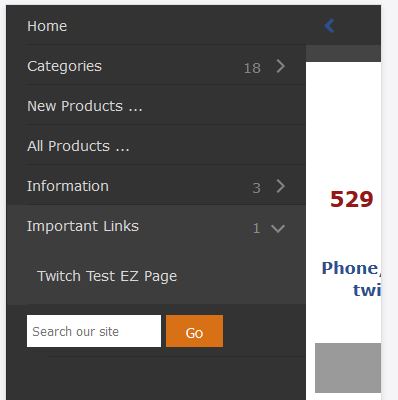
Add EZ pages to Mobile Menu

I believe this is what you are looking to do:

Add sort order here:

Then the EZ-pages will auto populate into the Mobile Menu.

As long as you have Admin > Configuration > EZ-Pages Settings turned on and set the sort order you will see them.

If you want to move everything into the ezpages ***or ***category_tabs header bar ***or ***pick and choose - you'll need to edit the base pages like - tpl_modules_mobile_menu.php by moving the EZ page lookup loop to the location you prefer within the other links, or make a new box heading and links of your own and turn off or hide the unused links.

Twitch.
https://www.twitchtoo.com Do you work for free? Please donate.
June 7.2026 - NOW AVAILABLE - Twitch Base8 - Obsidian

2 Mar 2019, 4:35 PM
#691
linuxguy2 avatar

linuxguy2

Zen Follower

Join Date:
Sep 2013
Location:
Texas
Posts:
315
Plugin Contributions:
0

Re: Responsive Classic (built in to Zen Cart v1.5.5) [Support Thread]

Design75:

That is actually not such a good idea, as some folders autoload all .php files. It is better to use the extension .old1 and .old2

Design75 is correct.
When I first started using ZC I was using that scheme where I left the extension as .php and ran into problems.
Some scripts load any *.php files available especially in some of the core folders.
Maybe you could do it like this.
file_name.php.ORG
file_name.php.old1
file_name.php.old2 etc..

I like to bring along the original script so I have a clean reference point to compare my changes to.
Capitalization makes them stand out.

28 Apr 2019, 6:40 PM
#692
ravynw34 avatar

ravynw34

Zen Follower

Join Date:
Feb 2007
Location:
Pennsylvania
Posts:
112
Plugin Contributions:
0

Re: Responsive Classic (built in to Zen Cart v1.5.5) [Support Thread]

Any quick and easy way to make the categories in header a drop down instead of each top level category going across? We have a store with 50+ categories so the current format would make the header super crowded?

28 Apr 2019, 7:56 PM
#693
linuxguy2 avatar

linuxguy2

Zen Follower

Join Date:
Sep 2013
Location:
Texas
Posts:
315
Plugin Contributions:
0

Re: Responsive Classic (built in to Zen Cart v1.5.5) [Support Thread]

ravynw34:

Any quick and easy way to make the categories in header a drop down instead of each top level category going across? We have a store with 50+ categories so the current format would make the header super crowded?

Can't you just use the sub-category(s) feature?
Also check the plugins area for different drop/flyout menu plugins

7 May 2019, 11:26 PM
#694
pixelpadre avatar

pixelpadre

Suspended

Join Date:
Jun 2007
Location:
Eustis, Florida, USA, EARTH
Posts:
868
Plugin Contributions:
0

Re: Responsive Classic (built in to Zen Cart v1.5.5) [Support Thread]

Hard to believe that colors may vary according to screen orientation. Makes no sense whatsoever.

ZC v1.5.7 "I was so much older then...I'm younger than that now" Cut the umbilical cord with webhosts after 20 years. FREEDOM!

28 May 2019, 2:53 PM
#695
don_wagner avatar

don_wagner

New Zenner

Join Date:
Jan 2009
Location:
Iowa, USA
Posts:
65
Plugin Contributions:
0

Re: Responsive Classic (built in to Zen Cart v1.5.5) [Support Thread]

Can't get this to work, but have to tell you and I am a novice at stylesheets, so maybe not making the changes correctly? I am using v1.5.6

<div id="logo" class="centred">
#logo{margin:10px 0;} .centred {text-align:center;}

Hoping this is a simple problem.

28 May 2019, 3:37 PM
#696
vdecals avatar

vdecals

Zen Follower

Join Date:
Jun 2009
Location:
Sparta, TN
Posts:
166
Plugin Contributions:
0

Re: Responsive Classic (built in to Zen Cart v1.5.5) [Support Thread]

I'm a novice too. Perhaps it's just spelling "centered" not "centred"?

My store - closed 12/05/2023
1.5.7d (upgraded from 1.5.7b), clone a template (cloned Responsive Classic Template), Sitemap XML v4.0, Square WebPay, PayPal Express Checkout, PHP Version: 7.4.29 (Zend: 3.4.0)

28 May 2019, 3:44 PM
#697
don_wagner avatar

don_wagner

New Zenner

Join Date:
Jan 2009
Location:
Iowa, USA
Posts:
65
Plugin Contributions:
0

Re: Responsive Classic (built in to Zen Cart v1.5.5) [Support Thread]

Not sure - anyway - here is the original how-to post for centering the Logo:

Attachment 18464

30 May 2019, 12:17 AM
#699
don_wagner avatar

don_wagner

New Zenner

Join Date:
Jan 2009
Location:
Iowa, USA
Posts:
65
Plugin Contributions:
0

Re: Responsive Classic (built in to Zen Cart v1.5.5) [Support Thread]

Got it, Mate ! Thanks a million dw08gm - you have "taught a man how to fish".

31 May 2019, 4:36 PM
#700
scentuous_aromas avatar

scentuous_aromas

New Zenner

Join Date:
May 2019
Location:
Danville, VA
Posts:
4
Plugin Contributions:
0

Re: Responsive Classic (built in to Zen Cart v1.5.5) [Support Thread]

For you professionals this should be a very easy question. I would like to remove the spacing in between my products:
Attachment 18472
Please make your comments as simple as you can because, I am not very good with programming.

Thank you very much.

I get by with a little help from my friends.