Zen Cart Logo
Forums / All Other Contributions/Addons / Wordpress On ZC [Support Thread]

Wordpress On ZC [Support Thread]

Views: 620,707

Results 261 to 280 of 1,861
25 Sep 2007, 3:54 PM
#261
busymom avatar

busymom

New Zenner

Join Date:
Jul 2007
Posts:
61
Plugin Contributions:
0

Wordpress On ZC [Support Thread]

I'm just headed off to install and have a few questions...

  1. I see that WP says that 2.3 is now their current stable version, but all discussion here has been on a 2.2.x base. Should I be concerned about using the current stable version?

  2. I'm installing WP into its own directory in root, and I currently have ZC installed in a subdirectory of root while I do my debug on the store. When I'm done, I was planning to change its location to root via the ZC instructions for changing the install directory. I was planning to have them share a database. Are there any concerns from the WP/WOZ perspective to be aware of if I proceed with this plan vs. waiting until ZC is in its final location before installing WOZ?

I've got other usage questions, but they can wait until I've got the installation working first! :blush:

TIA Karen

25 Sep 2007, 4:15 PM
#262
misty avatar

misty

Inactive

Join Date:
Apr 2004
Location:
UK
Posts:
5,752
Plugin Contributions:
1

Re: Wordpress On ZC [Support Thread]

bigjoed:

Misty,

Obviously you know a lot about wordpress on zencart. I'm running into a problem that is described above. On top of my page after I click on (for example) the uncategorized category, I get this html at the top of my page.

Uncategorized "/> Category keywords here... (all my categories get displayed here) ">

Then the rest of the page looks normal, any help will be really appreciated.

thanks
Url of your zencart site is?
Url of wordpress install relating to zencart install is?

25 Sep 2007, 4:23 PM
#263
misty avatar

misty

Inactive

Join Date:
Apr 2004
Location:
UK
Posts:
5,752
Plugin Contributions:
1

Re: Wordpress On ZC [Support Thread]

busyMom:

I'm just headed off to install and have a few questions...

  1. I see that WP says that 2.3 is now their current stable version, but all discussion here has been on a 2.2.x base. Should I be concerned about using the current stable version?

  2. I'm installing WP into its own directory in root, and I currently have ZC installed in a subdirectory of root while I do my debug on the store. When I'm done, I was planning to change its location to root via the ZC instructions for changing the install directory. I was planning to have them share a database. Are there any concerns from the WP/WOZ perspective to be aware of if I proceed with this plan vs. waiting until ZC is in its final location before installing WOZ?
    TIA Karen

  1. Version of wordpress should not make any difference.
  2. Having wordpress in root directory and zencart in sub directory may
    cause probs..
    Personally, would have zencart installed/working/tested
    in permanent home/url before attempting
    wordpress/woz install..
    Always backup zencart and its database before installing anything
    extra.
    HTH
25 Sep 2007, 5:25 PM
#264
busymom avatar

busymom

New Zenner

Join Date:
Jul 2007
Posts:
61
Plugin Contributions:
0

Re: Wordpress On ZC [Support Thread]

Thanks, Misty. I have another (probably dumb!) question...

Is there any preference to whether I use the same userid for the shared database access or if I give a unique userid to WP?

Also, while I'm thinking about it...
Are there any benefits to having them NOT share the same database (if in fact the integration will work that way)? I'm thinking things like future upgradability, WP mods, speed/performance to end user?

Thanks,
Karen

25 Sep 2007, 5:34 PM
#265
fred9v avatar

fred9v

New Zenner

Join Date:
Nov 2006
Location:
Quebec, Canada
Posts:
32
Plugin Contributions:
0

Re: Wordpress On ZC [Support Thread]

Fred9V:

Hi everybody!
I've successfully installed WOZ on localhost last night and I love it!

Since my website will be multilingual (French and English). I tried different language switch plugins but I really don't like how they behave so I'll be using 2 Wordpress installations.

I am now wondering how I could connect those two blogs on my multilingual cart. I am not a programmer but I came with the idea to replace the value of ABSPATH found in wordpress-config.php with a constant like BLOG_PATH and add a define in my language file so that when a user switch languages in Zen-Cart, the blog would update accordingly.

I tried using this new constant define in my main language file as well as in the provided language file in the mod with no success.

I'm pretty sure I'm close to a solution but can't get it to work that way. Anyone could provide me with tips? I surely must not be the only one who could benefit from such a tweak in the mod!

Thanks all!

Does anybody can help me on this one? If not, just let me know because in this case I will simply link to my Wordpress installations in the header from my template! :)

25 Sep 2007, 5:55 PM
#266
misty avatar

misty

Inactive

Join Date:
Apr 2004
Location:
UK
Posts:
5,752
Plugin Contributions:
1

Re: Wordpress On ZC [Support Thread]

Fred9V - Sorry cannot help with your problem..for security
reasons tho', I would link to your wordpress installs via zencart header,
as you have suggested..

busyMom..use whichever method suits your requirements..
have found that wordpress installed in same database as
zencart, can slow down performance of store, if you have
lots of products and numerous wordpress entries.

25 Sep 2007, 6:04 PM
#267
fred9v avatar

fred9v

New Zenner

Join Date:
Nov 2006
Location:
Quebec, Canada
Posts:
32
Plugin Contributions:
0

Re: Wordpress On ZC [Support Thread]

Hey Misty, thanks for letting me know!

Cheers!

26 Sep 2007, 9:49 AM
#268
bigjoed avatar

bigjoed

Zen Follower

Join Date:
Apr 2006
Location:
Fort Bragg, North Carolina
Posts:
152
Plugin Contributions:
0

Re: Wordpress On ZC [Support Thread]

Thanks Misty for your reply. My website has not been published yet. I'm building it on my server, once everything is the way it should be I will publish it. I'm attaching a picture that will describe my problem. I'm also including the source code below.

When I access "[zencart path]/index.php?main_page=wordpress" everything works fine. When I click on a category, that's when I get the wrong code. The wordpress installation is located at "[zencart path]/blog/" folder.

*<!DOCTYPE html PUBLIC "-//W3C//DTD XHTML 1.0 Transitional//EN" "http://www.w3.org/TR/xhtml1/DTD/xhtml1-transitional.dtd">

<html xmlns="http://www.w3.org/1999/xhtml" dir="ltr" lang="en"> <head> <title>Self Defense, Home Protection, Safety and Surveillance  <img alt="" src="includes/templates/theme005/images/a3.gif" width="4px" height="7px"/> Uncategorized : Zen Cart!, The Art of E-commerce</title> <meta http-equiv="Content-Type" content="text/html; charset=iso-8859-1" /> <meta name="keywords" content="Stun Guns Home Protection Surveillance Child Safety Knives Tasers Mace™ Defense Sprays Personal Alarms Animal Repellers Martial Arts Weapons Miscellaneous Fighting DVD's Home & Work Safety Diversion Safes Metal Detectors Pepper Sprays ecommerce, open source, shop, online shopping Self Defense, Home Protection, Safety and Surveillance  <img alt="" src="includes/templates/theme005/images/a3.gif" width="4px" height="7px"/> Uncategorized" /> <meta name="description" content="Zen Cart! : Self Defense, Home Protection, Safety and Surveillance  <img alt="" src="includes/templates/theme005/images/a3.gif" width="4px" height="7px"/> Uncategorized - Stun Guns Home Protection Surveillance Child Safety Knives Tasers Mace™ Defense Sprays Personal Alarms Animal Repellers Martial Arts Weapons Miscellaneous Fighting DVD's Home & Work Safety Diversion Safes Metal Detectors Pepper Sprays ecommerce, open source, shop, online shopping" /> <meta http-equiv="imagetoolbar" content="no" /> <meta name="author" content="The Zen Cart™ Team and others" /> <meta name="generator" content="shopping cart program by Zen Cart™, <http://www.zen-cart.com> eCommerce" /> <base href="http://localhost/bigjoedefense/" />*

Thanks so much for your help!

26 Sep 2007, 10:03 AM
#269
misty avatar

misty

Inactive

Join Date:
Apr 2004
Location:
UK
Posts:
5,752
Plugin Contributions:
1

Re: Wordpress On ZC [Support Thread]

Looks like you did not assign blog post to a category
BUT

My website has not been published yet. I'm building it on my server,
sometimes using localhost, on server/home computer,
correct/desired results are not achieved, and without an active domain
for your zencart, sorry..cannot help further at this stage..

26 Sep 2007, 10:12 AM
#270
bigjoed avatar

bigjoed

Zen Follower

Join Date:
Apr 2006
Location:
Fort Bragg, North Carolina
Posts:
152
Plugin Contributions:
0

Re: Wordpress On ZC [Support Thread]

Thanks for trying.

28 Sep 2007, 10:25 PM
#271
mafiasam avatar

mafiasam

Zen Follower

Join Date:
Jan 2006
Location:
Portland, Oregon
Posts:
256
Plugin Contributions:
0

Re: Wordpress On ZC [Support Thread]

Hello,
I have read through this entire thread and all the included instructions and the official wordpress instructions without luck.

I am attempting to install the wordpress addon to a fresh, local 1.3.7 Zen Cart installation (using EasyPHP on my computer and my Zen Cart installation works excellent)

Anyways, here's what I have tried and failed with...

  1. Uploaded(minus index.php) WordPress 2.2 into the Zen Cart root dir.
  2. created seperate database in phpmyadmin
  3. edited /ROOT/wp-config-sample.php to reflect database info and changed it to wp-config.php and left it in root folder
  4. Uploaded ZC_ROOT into Zen Cart root dir
  5. Commented out "return" in wp-include/template-loader.php
  6. (includes/extra_configures/wordpress-config.txt to wordpress-config.php) this didn't need to be done.
  7. ran wp-admin/install.php in browser - the installation doesn't seem to work at all -

the database I created remains empty and

I keep getting the following page after running the install...

click here for a pic of the error page

here are the details of my wp-config.php files for both the root folder and the includes/extra_configures folder

the root folder...

<?php
// ** MySQL settings ** //
define('DB_NAME', 'mafiasam_wordpress');    // The name of the database
define('DB_USER', 'mafiasam');     // Your MySQL username
define('DB_PASSWORD', '*******'); // ...and password
define('DB_HOST', 'localhost');    // 99% chance you won't need to change this value
define('DB_CHARSET', 'utf8');
define('DB_COLLATE', '');

// You can have multiple installations in one database if you give each a unique prefix
$table_prefix  = 'wp_';   // Only numbers, letters, and underscores please!

// Change this to localize WordPress.  A corresponding MO file for the
// chosen language must be installed to wp-content/languages.
// For example, install de.mo to wp-content/languages and set WPLANG to 'de'
// to enable German language support.
define ('WPLANG', '');

/* That's all, stop editing! Happy blogging. */

define('ABSPATH', dirname(__FILE__).'/');
require_once(ABSPATH.'wp-settings.php');
?>

the extra configures folder...

<?php
//
// wordpress on zencart by http://www.s-page.net/
//
define ('ABSPATH','/');

$woz_install=0;

if (file_exists(ABSPATH.'wp-config.php')) {
	$woz_install=1;
	define('WP_USE_THEMES', true);
	$wp_did_header = true;
	
	require_once(ABSPATH.'wp-config.php');

	$i=strlen(DIR_WS_CATALOG);
	$req=substr($_SERVER['REQUEST_URI'],$i,1);
	if($req=='?'){
		$_GET['main_page']='wordpress';
	}

	if(isset($_GET['feed'])){
		wp();
		gzip_compression();
		//	require_once('./wp-includes/template-loader.php');
		require_once(ABSPATH . WPINC . '/template-loader.php');

		exit();
	}
}

?>

and I guess that should be enough information to hang me, lol.

Does anyone have any advice?

thanks in advance

mafiasam

8 Oct 2007, 6:06 PM
#272
bigjoed avatar

bigjoed

Zen Follower

Join Date:
Apr 2006
Location:
Fort Bragg, North Carolina
Posts:
152
Plugin Contributions:
0

Re: Wordpress On ZC [Support Thread]

I have installed wordpress on zencart and it is working properly with the exception of the fact that whenever I type my website URL http://stunmasters.net, it gets redirected to the wordpress page http://www.stunmasters.net/?main_page=wordpress.

How can I stop that from happening.
Thanks in advance for any help.

8 Oct 2007, 7:15 PM
#273
corrado444 avatar

corrado444

New Zenner

Join Date:
Aug 2006
Posts:
20
Plugin Contributions:
0

Re: Wordpress On ZC [Support Thread]

Obviously, you have a redirect in place somewhere. Check in your .htaccess file or check in your control panel for a redirect script somewhere.

9 Oct 2007, 6:54 AM
#274
mafiasam avatar

mafiasam

Zen Follower

Join Date:
Jan 2006
Location:
Portland, Oregon
Posts:
256
Plugin Contributions:
0

Re: Wordpress On ZC [Support Thread]

mafiasam:

Hello,
I have read through this entire thread and all the included instructions and the official wordpress instructions without luck.

I am attempting to install the wordpress addon to a fresh, local 1.3.7 Zen Cart installation (using EasyPHP on my computer and my Zen Cart installation works excellent)

Anyways, here's what I have tried and failed with...

  1. Uploaded(minus index.php) WordPress 2.2 into the Zen Cart root dir.
  2. created seperate database in phpmyadmin
  3. edited /ROOT/wp-config-sample.php to reflect database info and changed it to wp-config.php and left it in root folder
  4. Uploaded ZC_ROOT into Zen Cart root dir
  5. Commented out "return" in wp-include/template-loader.php
  6. (includes/extra_configures/wordpress-config.txt to wordpress-config.php) this didn't need to be done.
  7. ran wp-admin/install.php in browser - the installation doesn't seem to work at all -

the database I created remains empty and

I keep getting the following page after running the install...

click here for a pic of the error page

here are the details of my wp-config.php files for both the root folder and the includes/extra_configures folder

the root folder...

...and I guess that should be enough information to hang me, lol.

Does anyone have any advice?

thanks in advance

mafiasam

Well, I figured it out with the help of my hosting company opensourcehost who are awesome. I just had them install wordpress in a separate folder in the zen cart installation because i just couldn't get wordpress to install.

then i followed the readme.html instructions included in the WordPress on Zencart contribution.

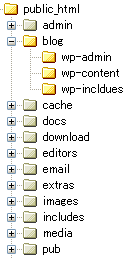
so you definitely can install this in a separate folder. mine was in a folder named blog in my zen cart folder
like this...

the entire trick lies in the editing of the zencart folder/includes/extra_configures/wordpress-config.php file.

mine ended up being...

define('ABSPATH', '/home/myservername/public_html/blog/');

so good luck, i hope this helps someone...

9 Oct 2007, 8:37 PM
#275
natee avatar

natee

New Zenner

Join Date:
Oct 2007
Posts:
6
Plugin Contributions:
0

Re: Wordpress On ZC [Support Thread]

I finally got this to work locally, using XAMPP. As stated above, editing wordpress-config.php is the key.

I installed XAMPP in C:\xampp, and placed ZenCart and WordPress into separate directories, like so: (see attachment for picture)

C:\xampp\htdocs\blog
C:\xampp\htdocs\catalog

I followed the instructions in the readme, keeping the installation as default as possible, and everything went smoothly. However, I kept getting: file not found: /wp-config-php. After nearly pulling my hair out, I discovered the correct configuration for wordpress-config.php:

define ('ABSPATH','/xampp/htdocs/blog/');

It appears to be working now. I'm running XAMPP 1.6.3a, Zen Cart 1.3.6, and WordPress 2.2.3, with the Acadame template by IChoze.

I'm going to attempt upgrading to ZC 1.3.7... If I have any problems I might post about them.

Hope this helps someone!

10 Oct 2007, 3:53 AM
#276
bigjoed avatar

bigjoed

Zen Follower

Join Date:
Apr 2006
Location:
Fort Bragg, North Carolina
Posts:
152
Plugin Contributions:
0

Re: Wordpress On ZC [Support Thread]

Hi Misty:

I hope that you can help me with this. In reference to my post #272, and the suggested solution #273. Do you know a way to fix this? I tried looking for a redirect onn the .htaccess file or on my cPanel. I can not find any.

To make a long story short, if you try going to my site http://stunmasters.net, you get automatically redirected to the blog page.

Thanks for your help.

PS. In reference to my post #268, the problem was that I was using an image as a breadcrumb divider. The html for that was added to the title and therefore the top of my page was totally messed up.

10 Oct 2007, 4:16 AM
#277
misty avatar

misty

Inactive

Join Date:
Apr 2004
Location:
UK
Posts:
5,752
Plugin Contributions:
1

Re: Wordpress On ZC [Support Thread]

bigjoed:

Hi Misty:

I hope that you can help me with this. In reference to my post #272, and the suggested solution #273. Do you know a way to fix this? I tried looking for a redirect onn the .htaccess file or on my cPanel. I can not find any.

To make a long story short, if you try going to my site http://stunmasters.net, you get automatically redirected to the blog page.

Thanks for your help.

PS. In reference to my post #268, the problem was that I was using an image as a breadcrumb divider. The html for that was added to the title and therefore the top of my page was totally messed up.
If you need to use htaccess, then wordpress is not installed correctly and adding an extra file could affect your zencart install and how it works correctly..suggest you read post by mafiasam (post 274)and reinstall wordpress..

10 Oct 2007, 4:24 AM
#278
homsteadmom avatar

homsteadmom

New Zenner

Join Date:
Mar 2007
Posts:
43
Plugin Contributions:
0

Re: Wordpress On ZC [Support Thread]

Ok I've been trying to get this set up for a while doing a lot of :frusty:. I have wordpress set up in a sub directory and zen in the root. I can access wordpress to write a post etc. But can't get them to show on my site. I'm getting this error:
file not found wp-config.php when I click on the wp sidebars. Also my post don't show in the sidebars either...
My site is www.homestead-acres.com
Any help is much appreciated!

Also I would like to have the blog accesable from the drop menu. Any advice on how to add it there??

Thanks!

10 Oct 2007, 4:31 AM
#279
misty avatar

misty

Inactive

Join Date:
Apr 2004
Location:
UK
Posts:
5,752
Plugin Contributions:
1

Re: Wordpress On ZC [Support Thread]

HomsteadMom:

I'm getting this error:
file not found wp-config.php when I click on the wp sidebars. Also my post don't show in the sidebars either...
My site is www.homestead-acres.com
Any help is much appreciated!

Also I would like to have the blog accesable from the drop menu. Any advice on how to add it there??

Thanks!
See Post 275..similar problem..fixed by ensuring wp-config.php is correctly
set..

10 Oct 2007, 10:09 AM
#280
andy1234 avatar

andy1234

Zen Follower

Join Date:
Oct 2006
Posts:
148
Plugin Contributions:
0

Re: Wordpress On ZC [Support Thread]

Hi everybody,

I have just installed a fresh wp on zc and it works fine, but opens wp in a separate window (not as a zc page). What is wrong with the templates? I managed to install it a long time ago on another site, but just cannot remember how I fixed this.

Please, advise, it should be a quick fix with the tempolates somewhere.

Thanks

A