Zen Cart Logo
Forums / All Other Contributions/Addons / Google SitemapAdmin

Google SitemapAdmin

Views: 229,069

Results 481 to 500 of 842
23 Dec 2007, 11:56 PM
#481
helpme avatar

helpme

Totally Zenned

Join Date:
Apr 2007
Posts:
632
Plugin Contributions:
0

Google SitemapAdmin

MeltDown:

I'm getting the following 500 error when I attempt to create the sitemap in Google XML Sitemap Admin:

I searched this thread for this partucular error without success.

Any suggestions? Thanks

I've got the same problem. Anyone, anyone?

24 Dec 2007, 3:49 AM
#482
golowenow avatar

golowenow

New Zenner

Join Date:
Jul 2006
Location:
Washington State
Posts:
78
Plugin Contributions:
0

Re: Google SitemapAdmin

I have been looking at the code for this mod and see that external links are skipped.:yuck: On MY site I have zencart at the front. I also have a section of the site I call a reference site which is placed inside a folder inside htdocs. The pages there are all html pages and it is a large section of my website. Now the only way I can reference to this area is with ezpages creating a link in the IMPORTANT LINKS section. The reference area has its own index.html page which get people to all the other pages in that area. The problem is that I have to use an external link to get to it even though it is on the same server and in the same domain.:frusty: Converting these pages to ZC style pages would be a MAJOR job taking too much time. I can see in the code to this mod that it is probably not too large an undertaking to modify it to allow external links to be indexed in the ezpages.xml file so that search engines can find it. Already I have installed the ezpages_on_sitemap V1.01 mod which has put the external linked pages on the ZenCart sitemap. This shows that it CAN be done.:smartalec: Does anyone know what code to change to allow the external linked ezpages to be listed and what code to put in to do it? Many of us do not JUST have ZC on our sites and I am sure many are interested in this option.

24 Dec 2007, 7:54 PM
#483
davewest avatar

davewest

Totally Zenned

Join Date:
Dec 2007
Location:
Payson, AZ
Posts:
1,075
Plugin Contributions:
7

Re: Google SitemapAdmin

Site maps are not that hard to make... would take longer to modify the code.

If your not using a 'robot.txt' file, then your losing the full effect of a site map. Of course not all bots follow what's in the file. You can tell the bots where your other folder is with in the robot text file. As for coding it into the mod, it wouldn't be to hard.

If your not sure how to use a robot text file, Google it.
This site below has a nice online tool for making one as well.

http://www.mcanerin.com/EN/search-engine/robots-txt.asp

27 Dec 2007, 11:55 PM
#484
smb avatar

smb

New Zenner

Join Date:
Feb 2006
Location:
Minneapolis, MN
Posts:
14
Plugin Contributions:
0

Re: Google SitemapAdmin

My host GoDaddy no longer supports
file('http://www.google.com/webmasters/sitemaps/ping?sitemap=' . $google->submit_url));

This is a solution that works for me... for now at least... until I find a better solution... and some more dotdotdots... :smile:

I have this above "if ($submit){"

function ExtractString($str, $start, $end) {
	$str_low = strtolower($str);
	$pos_start = strpos($str_low, $start);
	$pos_end = strpos($str_low, $end, ($pos_start + strlen($start)));
	if ( ($pos_start !== false) && ($pos_end !== false) ) {
		$pos1 = $pos_start + strlen($start);
		$pos2 = $pos_end - $pos1;
		return substr($str, $pos1, $pos2);
	}
}

And this between the "Start Pinging..." and "End Pinging..."

echo '<br />Start Pinging ----------------------------------------------------------------------------------------';
		if(isset($_GET['pinggoogle']) && $_GET['pinggoogle'] == 'yes') {
			echo '<br />Google Ping...<br />';
			echo '<div style="background-color: #FFFFCC; border: 1px solid #000000; padding: 5px">';
			/***************/
			$ch = curl_init("http://www.google.com/webmasters/sitemaps/ping?sitemap=". $google->submit_url);
			curl_setopt($ch, CURLOPT_HEADER, 0);
			curl_setopt($ch, CURLOPT_RETURNTRANSFER, 1);
			$curl_results = curl_exec($ch);
			curl_close($ch);
			$bodytxt = ExtractString($curl_results, "<h2>", "</h2>");
			echo $bodytxt;
			/***************/
			echo '</div>';
		}
		if(isset($_GET['pingyahoo']) && $_GET['pingyahoo'] == 'yes') {
			echo '<br />Yahoo! Ping...<br />';
			echo '<div style="background-color: #FFFFCC; border: 1px solid #000000;">';
			/***************/
			$ch = curl_init("http://search.yahooapis.com/SiteExplorerService/V1/ping?sitemap=". $google->submit_url);
			curl_setopt($ch, CURLOPT_HEADER, 0);
			curl_setopt($ch, CURLOPT_RETURNTRANSFER, 1);
			$curl_results = curl_exec($ch);
			curl_close($ch);
			$bodytxt = $curl_results;
			//$bodytxt = ExtractString($curl_results, "<Message>", "</Message>");
			echo $bodytxt;
			/***************/
			echo '</div>';
		}
		if(isset($_GET['pingask']) && $_GET['pingask'] == 'yes') {
			echo '<br />Ask.com Ping...<br />';
			echo '<div style="background-color: #FFFFCC; border: 1px solid #000000;">';
			/***************/
			$ch = curl_init("http://submissions.ask.com/ping?sitemap=". $google->submit_url);
			curl_setopt($ch, CURLOPT_HEADER, 0);
			curl_setopt($ch, CURLOPT_RETURNTRANSFER, 1);
			$curl_results = curl_exec($ch);
			curl_close($ch);
			$bodytxt = ExtractString($curl_results, "<h1>", "</h1>");
			echo $bodytxt;
			/***************/
			echo '</div>';
		}
		if(isset($_GET['pingms']) && $_GET['pingms'] == 'yes') {
			echo '<br />Microsoft Ping...<br />';
			echo '<div style="background-color: #FFFFCC; border: 1px solid #000000;">';
			/***************/
			$ch = curl_init("http://www.moreover.com/ping?u=". $google->submit_url);
			curl_setopt($ch, CURLOPT_HEADER, 0);
			curl_setopt($ch, CURLOPT_RETURNTRANSFER, 1);
			$curl_results = curl_exec($ch);
			curl_close($ch);
			$bodytxt = $curl_results;
			echo $bodytxt;
			/***************/
			echo '</div>';
		}
echo '<br />End Pinging ----------------------------------------------------------------------------------------<br />';

use at your own risk... I take no responsibility nor support any of the above code... blah blah blah... legaleze mumbo jumbo...

30 Dec 2007, 9:11 PM
#485
willandjenny avatar

willandjenny

New Zenner

Join Date:
Nov 2007
Posts:
25
Plugin Contributions:
0

Re: Google SitemapAdmin

The mod worked fine until last week. I now receive the following error when I try to update the sitemap. I would sincerely appreciate any advice on how to fix this problem. I am not "code-savvy" so I do not know what the following error message means.

fopen(DIR_FS_CATALOG/sitemapcategories.xml) [function.fopen]: failed to open stream: No such file or directory in /home/wscheil/public_html/googlesitemap.php on line 240

3 Jan 2008, 8:49 PM
#486
smb avatar

smb

New Zenner

Join Date:
Feb 2006
Location:
Minneapolis, MN
Posts:
14
Plugin Contributions:
0

Re: Google SitemapAdmin

willandjenny:

The mod worked fine until last week. I now receive the following error when I try to update the sitemap. I would sincerely appreciate any advice on how to fix this problem. I am not "code-savvy" so I do not know what the following error message means.

fopen(DIR_FS_CATALOG/sitemapcategories.xml) [function.fopen]: failed to open stream: No such file or directory in /home/wscheil/public_html/googlesitemap.php on line 240

Check that the sitemap files exist in the correct area and that the proper permissions are applied to them.

Per the readme.txt file included with the mod "If error messages occur, change permissions on the XML files to 777" --> this can be done using an FTP program like FileZilla.

3 Jan 2008, 9:25 PM
#487
willandjenny avatar

willandjenny

New Zenner

Join Date:
Nov 2007
Posts:
25
Plugin Contributions:
0

Re: Google SitemapAdmin

smb:

Check that the sitemap files exist in the correct area and that the proper permissions are applied to them.

Per the readme.txt file included with the mod "If error messages occur, change permissions on the XML files to 777" --> this can be done using an FTP program like FileZilla.

Thank you very much for your help. I did not change the xml file permissions between when it worked and then quit working, but now that the permissions have been reset, the mod now works properly again. I truly appreciate your advice.

Sincerely,

William
:clap:

10 Jan 2008, 2:05 AM
#488
phark avatar

phark

New Zenner

Join Date:
Sep 2006
Location:
Tampa, FL
Posts:
36
Plugin Contributions:
0

Re: Google SitemapAdmin

Greets!

I've installed the mod and all seems fine. BUT, when I click on the button to create the sitemap, the small window pops up but its just white.

I've changed all the the file permissions and and used absolute paths. I've seen many post on this in this thread, but did not find the solution to correct this problem.

I running on Linus, shared hosting, a martini and this is an addon domain.

Any suggestions?

Thanks,
Patrick

17 Jan 2008, 6:04 PM
#489
anjordan77 avatar

anjordan77

Zen Follower

Join Date:
Jun 2006
Location:
Midlothian, Virginia, United States
Posts:
110
Plugin Contributions:
0

Re: Google SitemapAdmin

What are the best configuration settings to use? There isn't really info on what each stands for etc. Obviously i'd like to get all my products indexed but it just doesn't seem to be happening.

30 Jan 2008, 2:45 AM
#490
bahnstoermer avatar

bahnstoermer

New Zenner

Join Date:
Aug 2007
Posts:
94
Plugin Contributions:
0

Re: Google SitemapAdmin

From the readme:
*

  1. Unzip and upload all files to your store directory;
  2. Go to Admin->Tools->Install SQL Patches and install install.sql.
    **Copying SQL code from googleanalytics.sql file (using a text editor) and paste into form in your shops
    admin at Tools > Install SQL patches (copy & paste, don't upload!!!).
    or
    Copy install_googlesitemap.php to the admin directory, start it, select Install and press GO button.**3. Go to Admin->Configuration->Google Sitemap Configuration and setup all parameters
  3. Go to Admin->Tools>Google XML Sitemap (If error messages occur, change permissions on the XML files to 777);*

Confused about what the heck the bolded text is trying to say. Are those optional?

-I completed step one and verified.
-I ran the install.sql in the Admin, it says 8 statements processed and gives a huge list of results.

  • I skipped the rest of #2 (the bolded) because it's not clear to me what to do
  • I go to #3 and don't change anything
  • Set the file permissions to 777 for the four .xml files
  • I attempt #4, but get a 298 error:

Call to undefined function: zen_get_info_page() in ...catalog/admin/googlesitemap.php

I do have google analytics installed and working but I'm not sure what that code is for, and how do I "start" the install_googlesitemap.php ?

Help??

30 Jan 2008, 9:38 AM
#491
a_berezin avatar

a_berezin

Deceased

Join Date:
Aug 2004
Location:
Saint Petersburg, Russia
Posts:
1,782
Plugin Contributions:
5

Re: Google SitemapAdmin

What zen-cart version?

30 Jan 2008, 9:57 AM
#492
phark avatar

phark

New Zenner

Join Date:
Sep 2006
Location:
Tampa, FL
Posts:
36
Plugin Contributions:
0

Re: Google SitemapAdmin

1.3.8, I had to roll back to that version so I could use the safebuy mod

31 Jan 2008, 1:06 AM
#493
bahnstoermer avatar

bahnstoermer

New Zenner

Join Date:
Aug 2007
Posts:
94
Plugin Contributions:
0

Re: Google SitemapAdmin

1.3.7 (not sure who you were asking :))

Anyone help here?

31 Jan 2008, 1:17 AM
#494
bahnstoermer avatar

bahnstoermer

New Zenner

Join Date:
Aug 2007
Posts:
94
Plugin Contributions:
0

Re: Google SitemapAdmin

Oh, and also I didn't run any of the updates in that folder because they weren't documented, do I need to run one of those?

1 Feb 2008, 4:46 PM
#495
a_berezin avatar

a_berezin

Deceased

Join Date:
Aug 2004
Location:
Saint Petersburg, Russia
Posts:
1,782
Plugin Contributions:
5

Re: Google SitemapAdmin

Bahnstoermer:

Call to undefined function: zen_get_info_page() in ...catalog/admin/googlesitemap.php
improperly installed - incorrectly upload files

3 Feb 2008, 5:10 PM
#496
bahnstoermer avatar

bahnstoermer

New Zenner

Join Date:
Aug 2007
Posts:
94
Plugin Contributions:
0

Re: Google SitemapAdmin

Really? I guess that sounds viable, I thought I checked and rechecked, but I will do so again.

You mean the manually installed files on my server, not anything from the script right?

5 Feb 2008, 6:06 AM
#497
meltdown avatar

meltdown

Totally Zenned

Join Date:
Jun 2006
Location:
My family and I live in Brighton, England
Posts:
947
Plugin Contributions:
0

Re: Google SitemapAdmin

I've had this mod installed for a while now and it has been all good. Now I am receiving the following Parsing error:

We were unable to read your Sitemap. It may contain an entry we are unable to recognize. Please validate your Sitemap before resubmitting.
for both sitemapindex.xml and sitemapezpages.xml.

Any ideas how I can address this?

Thanks

6 Feb 2008, 5:20 PM
#498
pgmason avatar

pgmason

New Zenner

Join Date:
Feb 2008
Posts:
2
Plugin Contributions:
0

Re: Google SitemapAdmin

Hi

When I try to generate sitemaps I get the following error:

Warning: fopen(/home/toolsand/public_html/sitemapproducts.xml) [function.fopen]: failed to open stream: Permission denied in /home/toolsand/public_html/googlesitemap.php on line 221
ERROR: Google Product Sitemap Generation FAILED!

Warning: fopen(/home/toolsand/public_html/sitemapcategories.xml) [function.fopen]: failed to open stream: Permission denied in /home/toolsand/public_html/googlesitemap.php on line 221
ERROR: Google Category Sitemap Generation FAILED!

Warning: fopen(/home/toolsand/public_html/sitemapindex.xml) [function.fopen]: failed to open stream: Permission denied in /home/toolsand/public_html/googlesitemap.php on line 221
ERROR: Google Sitemap Index Generation FAILED!

Using Zen-Cart version 1.3.7. All this was set up a while ago by someone else, but no sitemaps have been created.

googlesitemap.php says version 1.2 on line 16, if that's the right thing, and it was added on 20/6/2007. I tried CHMODing that file to 777 in case that was what was meant, and it doesn't work.

I see several references throughout the thread to setting the permissions of the xml files to 777. It seems the xml files aren't actually being created at all, however, so I can't CHMOD them.

Can anyone help?

Cheers

Pete

6 Feb 2008, 5:30 PM
#499
pgmason avatar

pgmason

New Zenner

Join Date:
Feb 2008
Posts:
2
Plugin Contributions:
0

Re: Google SitemapAdmin

Never Mind - I've solved my own problem. I created empty files with those filenames and permissions and uploaded them, and then ran the sitemap mod. Everything worked fine. Was I meant to do this all along (in which case I must have missed that bit), or was something not right?

Pete

6 Feb 2008, 6:04 PM
#500
zbargain avatar

zbargain

New Zenner

Join Date:
Nov 2006
Posts:
12
Plugin Contributions:
0

Re: Google SitemapAdmin

So, I'm kind of stuck...
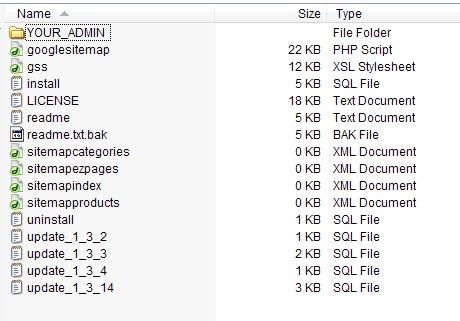
If you look at this picture, I installed everything INSIDE the "YOUR_ADMIN" folder, into my "/admin/" directory. My first question is where do the other files in this picture go? Or do they go anywhere? Reason I ask is (besides the instructions not being the best) because I have "google XML sitemap" in my admin>tools and in admin>configuration. But when I go to admin>tools>google xml sitemap>step 1 and click "here" to create or edit your sitemap (a blank popup window) comes up. Same thing with step 2, if I try to "send" (a blank popup window) comes up...

Did I not install the sql patch correctly? I pasted it into the query form and hit send like I think the instructions told me to. Again, I didn't install the XML files in this picture anywhere because the instructions in the install.txt aren't the greatest. I only installed everything from the YOUR_ADMIN folder...

any help would be appreciated