Forums / Addon Templates / Comstock Template

Comstock Template

Views: 132,662

Results 581 to 600 of 722
11 Aug 2010, 11:20 AM
#581
pageblair avatar

pageblair

Zen Follower

Join Date:
Feb 2010
Location:
ny
Posts:
223
Plugin Contributions:
0

Comstock Template

Clyde, please tell me how to INCREASE # of columns.
It is not clear the max values or layout settings.

I want 4 columns across.
Thank you

11 Aug 2010, 1:19 PM
#582
clydejones avatar

clydejones

Deceased

Join Date:
Nov 2005
Location:
Colorado Springs, CO USA
Posts:
7,017
Plugin Contributions:
12

Re: Comstock Template

pageblair:

Clyde, please tell me how to INCREASE # of columns.
It is not clear the max values or layout settings.

I want 4 columns across.
Thank you

admin -> configuration -> product listing -> Product Listing - Columns Per Row

NOTE: We are sorry that Clyde is no longer with us.
We are grateful for all his contributions to the Zen Cart community.

11 Aug 2010, 9:59 PM
#583
pageblair avatar

pageblair

Zen Follower

Join Date:
Feb 2010
Location:
ny
Posts:
223
Plugin Contributions:
0

Re: Comstock Template

admin -> configuration -> product listing -> Product Listing - Columns Per Row

this is not available

11 Aug 2010, 10:13 PM
#584
clydejones avatar

clydejones

Deceased

Join Date:
Nov 2005
Location:
Colorado Springs, CO USA
Posts:
7,017
Plugin Contributions:
12

Re: Comstock Template

pageblair:

admin -> configuration -> product listing -> Product Listing - Columns Per Row

this is not available

if its not available then there is something wrong with your Zen Cart admin installation.

Attachment #7939

NOTE: We are sorry that Clyde is no longer with us.
We are grateful for all his contributions to the Zen Cart community.

12 Aug 2010, 9:28 AM
#585
pageblair avatar

pageblair

Zen Follower

Join Date:
Feb 2010
Location:
ny
Posts:
223
Plugin Contributions:
0

Re: Comstock Template

I have checked all my comstock and other templates also

none of the has it under

configuration>product listing

12 Aug 2010, 12:44 PM
#586
clydejones avatar

clydejones

Deceased

Join Date:
Nov 2005
Location:
Colorado Springs, CO USA
Posts:
7,017
Plugin Contributions:
12

Re: Comstock Template

pageblair:

I have checked all my comstock and other templates also

none of the has it under

configuration>product listing

are you logging into yourzen cart admin panel?

as I said, if its not showing up then you have a problem somewhere in the installation of your zen cart admin files.

and this would then not be a template specific problem.

NOTE: We are sorry that Clyde is no longer with us.
We are grateful for all his contributions to the Zen Cart community.

16 Aug 2010, 10:47 PM
#587
sara_s_soaps avatar

sara_s_soaps

New Zenner

Join Date:
Apr 2008
Posts:
45
Plugin Contributions:
0

Re: Comstock Template

I've got my ZC updated to the most current and my site is www.SarasSoapsnSuch.com. Running WINXP.

Bottom of left-hand column, there's a sidebox labeled "more information." My "About Us" and "Where to Buy Sara's Soaps 'n Such Products" links come to... nada. When I click on them, I get "page 2" and "page 4," but no dialogue. However, in my admin section, I've gone to admin -> tools -> define pages editor and written in the script for these pages (and saved it, too, of course). Donal suggested it's a cookies issue, but I've cleaned out my cache, temp internet files and cookies, to no avail. Also, when I click on the link for wholesale and private label information, the dialogue for that is there, but it's cut off my email address with its link.

Help! I'm planning on launching a new product line with its own unique site, but want to have this one fully functioning first. Thanks!

~Sara

P.S. - Clyde, have you been following @OpposeSCA on Twitter? It's like that bill that they tried to pass in CO, but much, much worse.

Sara's Soaps 'n Such
Good. Clean. Fun.
http://www.sarassoapsnsuch.com

16 Aug 2010, 11:12 PM
#588
clydejones avatar

clydejones

Deceased

Join Date:
Nov 2005
Location:
Colorado Springs, CO USA
Posts:
7,017
Plugin Contributions:
12

Re: Comstock Template

Sara's Soaps:

I've got my ZC updated to the most current and my site is www.SarasSoapsnSuch.com. Running WINXP.

Bottom of left-hand column, there's a sidebox labeled "more information." My "About Us" and "Where to Buy Sara's Soaps 'n Such Products" links come to... nada. When I click on them, I get "page 2" and "page 4," but no dialogue. However, in my admin section, I've gone to admin -> tools -> define pages editor and written in the script for these pages (and saved it, too, of course). Donal suggested it's a cookies issue, but I've cleaned out my cache, temp internet files and cookies, to no avail. Also, when I click on the link for wholesale and private label information, the dialogue for that is there, but it's cut off my email address with its link.

Help! I'm planning on launching a new product line with its own unique site, but want to have this one fully functioning first. Thanks!

~Sara

P.S. - Clyde, have you been following @OpposeSCA on Twitter? It's like that bill that they tried to pass in CO, but much, much worse.

Are those files writable in includes/languages/english/html_inlcudes/comstock/

NOTE: We are sorry that Clyde is no longer with us.
We are grateful for all his contributions to the Zen Cart community.

20 Aug 2010, 9:11 PM
#589
sara_s_soaps avatar

sara_s_soaps

New Zenner

Join Date:
Apr 2008
Posts:
45
Plugin Contributions:
0

Re: Comstock Template

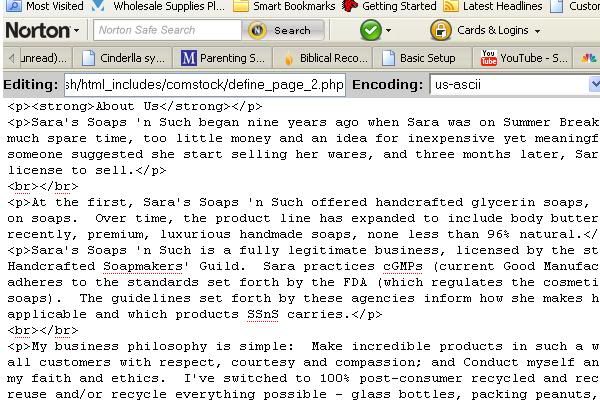
Went there, did that. No love. I'd like to get rid of the "page 2," "page 3" and "page 4" headers, too. Anyway, first problem first. While my (new & improved) dialogue on page 3 - wholesale and private label is showing up, the other two aren't, yet there is stuff there. Let me try a screen shot.

As you can see, I'm in the right place. And, yes, I saved my changes after I made them. What next?

~Sara

Sara's Soaps 'n Such
Good. Clean. Fun.
http://www.sarassoapsnsuch.com

20 Aug 2010, 10:55 PM
#590
clydejones avatar

clydejones

Deceased

Join Date:
Nov 2005
Location:
Colorado Springs, CO USA
Posts:
7,017
Plugin Contributions:
12

Re: Comstock Template

Sara's Soaps:

Went there, did that. No love. I'd like to get rid of the "page 2," "page 3" and "page 4" headers, too. Anyway, first problem first. While my (new & improved) dialogue on page 3 - wholesale and private label is showing up, the other two aren't, yet there is stuff there. Let me try a screen shot.

As you can see, I'm in the right place. And, yes, I saved my changes after I made them. What next?

~Sara

have you tried to manually edit those pages using something like notepad ++ and then uploading/FTPing them to the server?


You'll also need to edit the following defines:

includes/languages/english/
page_2.php
page_3.php
page_4.php

define('NAVBAR_TITLE', 'Page ?');
define('HEADING_TITLE', 'Page ?');

save the edited files to includes/languages/english/comstock/

NOTE: We are sorry that Clyde is no longer with us.
We are grateful for all his contributions to the Zen Cart community.

22 Aug 2010, 3:47 AM
#591
sara_s_soaps avatar

sara_s_soaps

New Zenner

Join Date:
Apr 2008
Posts:
45
Plugin Contributions:
0

Re: Comstock Template

Got it! And it was the stupidest thing in the world on my part. Admin -> configure -> Define page status. Really helps if it's turned on! :frusty: Donal spent a lot of time working on this tonight, both with me and even after I'd stepped away from the computer. He totally rocks! And he's brilliant to boot! I've also discovered recently that he's incredibly modest (he told me so himself!). LOL. Thanks, Clyde, for your help. Thanks, Donal, too. :hug:

~Sara

Sara's Soaps 'n Such
Good. Clean. Fun.
http://www.sarassoapsnsuch.com

22 Aug 2010, 4:10 AM
#592
clydejones avatar

clydejones

Deceased

Join Date:
Nov 2005
Location:
Colorado Springs, CO USA
Posts:
7,017
Plugin Contributions:
12

Re: Comstock Template

Sara's Soaps:

Got it! And it was the stupidest thing in the world on my part. Admin -> configure -> Define page status. Really helps if it's turned on! :frusty: Donal spent a lot of time working on this tonight, both with me and even after I'd stepped away from the computer. He totally rocks! And he's brilliant to boot! I've also discovered recently that he's incredibly modest (he told me so himself!). LOL. Thanks, Clyde, for your help. Thanks, Donal, too. :hug:

~Sara

glad you got it sorted

NOTE: We are sorry that Clyde is no longer with us.
We are grateful for all his contributions to the Zen Cart community.

14 Sep 2010, 1:36 AM
#593
nohart avatar

nohart

Zen Follower

Join Date:
Apr 2010
Posts:
133
Plugin Contributions:
0

Re: Comstock Template

I have seen this asked several times in this thread but I cant seem to find an answer. My cart is here: http://www.aclassactapparel.com/ The Bestsellers Box has a broken line going around it &/or a white line running across it. I also believe this same condition shows up in the Quick Re-Order Box. I cant seem to find a fix anywhere. Does anyone have any fixes for this problem?

Thanks in advance for your help

14 Sep 2010, 1:55 AM
#594
nohart avatar

nohart

Zen Follower

Join Date:
Apr 2010
Posts:
133
Plugin Contributions:
0

Re: Comstock Template

Ok I tried what maxus said in post #512 and that worked for the Bestsellers Box found in the file tpl_best_sellers.php But I still cant seem to find how to fix the Quick Re-Order Box. This file doesn't have the div class="wrapper" tag so I don't know what to edit in the file tpl_order_history.php

The edit for the Bestsellers box effectively removed the broken line or white line across the box but in doing so the insertion of <br> created a line break now... Still not 100% fix but better than being broken...

15 Sep 2010, 1:36 AM
#595
nohart avatar

nohart

Zen Follower

Join Date:
Apr 2010
Posts:
133
Plugin Contributions:
0

Re: Comstock Template

It seems to me that the product_reviews_write.php, product_reviews.php, product_reviews_info.php do not have page specific CSS. I am wondering if anyone knows CSS well enough to help out? My Review pages need some help with the Text and line spacing. The text seems to be all crammed together and I am not sure how to specify elements and target them for CSS. I know about the main stylesheet.css but I dont know how to go about correcting the text issues. Can anyone shed some light on this?

The page(s) in question is:
http://www.aclassactapparel.com/index.php?main_page=product_reviews&products_id=230

and

http://www.aclassactapparel.com/index.php?main_page=product_reviews_info&products_id=230&reviews_id=2

I would most like to correct the line spacing on these pages

Thanks in advance

15 Sep 2010, 2:00 AM
#596
clydejones avatar

clydejones

Deceased

Join Date:
Nov 2005
Location:
Colorado Springs, CO USA
Posts:
7,017
Plugin Contributions:
12

Re: Comstock Template

nohart:

It seems to me that the product_reviews_write.php, product_reviews.php, product_reviews_info.php do not have page specific CSS. I am wondering if anyone knows CSS well enough to help out? My Review pages need some help with the Text and line spacing. The text seems to be all crammed together and I am not sure how to specify elements and target them for CSS. I know about the main stylesheet.css but I dont know how to go about correcting the text issues. Can anyone shed some light on this?

The page(s) in question is:
http://www.aclassactapparel.com/index.php?main_page=product_reviews&products_id=230

and

http://www.aclassactapparel.com/index.php?main_page=product_reviews_info&products_id=230&reviews_id=2

I would most like to correct the line spacing on these pages

Thanks in advance

try adding the following at the bottom of the stylesheet.css

includes/templates/comstock/css/stylesheet.css

#productReviewsDefaultHeading, #reviewsInfoDefaultHeading, #reviewsInfoDefaultMainContent, #reviewsInfoDefaultDate, .productReviewsDefaultProductMainContent, .productReviewsDefaultReviewer, .rating {
line-height:1.3em;
}

NOTE: We are sorry that Clyde is no longer with us.
We are grateful for all his contributions to the Zen Cart community.

15 Sep 2010, 8:59 PM
#597
nohart avatar

nohart

Zen Follower

Join Date:
Apr 2010
Posts:
133
Plugin Contributions:
0

Re: Comstock Template

Awesome Clyde that did it! You saved me a lot of time, headaches and heartache too :cool:. Thank you so much!

2 Oct 2010, 10:22 PM
#598
sph avatar

sph

Totally Zenned

Join Date:
Jan 2006
Posts:
1,556
Plugin Contributions:
0

Re: Comstock Template

Have several sites using comstock template, although look changed. Having trouble with, I guess it's the breadcrumb nav, which is hidden. Please see red circle in pic on link here:

http://www.findmyquinceaneradress.com/images/comstock-problem.jpg

If you place cursor near top of body white space the nav will slightly pop-up.

http://www.findmyquinceaneradress.com/alyce-quinceanera-dresses-c-21

It does not do this on another site, which is using a h3 middle banner.

Thank you for any help.

Steve
prommart.com

2 Oct 2010, 10:40 PM
#599
clydejones avatar

clydejones

Deceased

Join Date:
Nov 2005
Location:
Colorado Springs, CO USA
Posts:
7,017
Plugin Contributions:
12

Re: Comstock Template

SPH:

Have several sites using comstock template, although look changed. Having trouble with, I guess it's the breadcrumb nav, which is hidden. Please see red circle in pic on link here:

http://www.findmyquinceaneradress.com/images/comstock-problem.jpg

If you place cursor near top of body white space the nav will slightly pop-up.

http://www.findmyquinceaneradress.com/alyce-quinceanera-dresses-c-21

It does not do this on another site, which is using a h3 middle banner.

Thank you for any help.

The problem with the breadcrumb is that it has no height.

open the stylesheet.css find the following and adjust the height element:

#navBreadCrumb {
margin: 0 auto;
padding: .5em 0 .5em 2px;
font-size: 1em;
font-weight: bold;
color: #000;
height: 0px
}

In which browser is this "pop-up" happening?

I've checked your site in FF, IE8, Opera, Safari and Chrome
and didn't notice anything.

NOTE: We are sorry that Clyde is no longer with us.
We are grateful for all his contributions to the Zen Cart community.

4 Oct 2010, 3:52 AM
#600
sph avatar

sph

Totally Zenned

Join Date:
Jan 2006
Posts:
1,556
Plugin Contributions:
0

Re: Comstock Template

Thanks! Set px at 10 and now nav crumb is showing (although our colors aren't best for the dark background).

By pop-up I meant that it normally did not show when set at "0", but if you moved cursor near where it would be it would kind of "pop-up"; I think because of the text color change when cursor is placed on it, made top of link easier to see.

Steve
prommart.com