Zen Cart Logo
Forums / All Other Contributions/Addons / Just another Cross-Sell mod (support thread)

Just another Cross-Sell mod (support thread)

Views: 133,961

Results 521 to 540 of 704
14 Jul 2009, 7:29 AM
#521
batteryman avatar

batteryman

Zen Follower

Join Date:
Jul 2004
Location:
Las Vegas
Posts:
327
Plugin Contributions:
0

Just another Cross-Sell mod (support thread)

That I am not sure about. I am not to familiar with module manager. Where are you checking to see if it was created in phpmyadmin?

Posted from my iPhone
Posted via Mobile Device

14 Jul 2009, 7:44 AM
#522
langflyer avatar

langflyer

New Zenner

Join Date:
Nov 2007
Posts:
47
Plugin Contributions:
0

Re: Just another Cross-Sell mod (support thread)

Under the database, i can c this table module_version_tracker with 0 record.

if i drop the table, and go to admin->tools->module manager, the same error message will appear.
:no:

14 Jul 2009, 1:55 PM
#523
mmwilcox avatar

mmwilcox

New Zenner

Join Date:
Nov 2007
Location:
Huntington, Indiana
Posts:
67
Plugin Contributions:
0

Re: Just another Cross-Sell mod (support thread)

batteryman:

Can you give me an example of it used on your site? All changes are made using the admin >> configuration >> cross sell to tell how many products are show and all layout changes are made by editing the css file in the css folder in your_template..

I will help you with the css if you like. Just need the page and what your desired look will be.

I think I got it. I looked at the css and experimented a bit and found I could widen the scroll box. Can't get too big or it overlaps the sideboxes. That's easy enough to avoid.

Thanks again for this mod. Matt
Here's an example of my usage: 69003

14 Jul 2009, 7:26 PM
#524
batteryman avatar

batteryman

Zen Follower

Join Date:
Jul 2004
Location:
Las Vegas
Posts:
327
Plugin Contributions:
0

Re: Just another Cross-Sell mod (support thread)

mmwilcox:

I think I got it. I looked at the css and experimented a bit and found I could widen the scroll box. Can't get too big or it overlaps the sideboxes. That's easy enough to avoid.

Thanks again for this mod. Matt
Here's an example of my usage: 69003

A couple of suggestions....

...in stylesheet_ORIGINAL.css (line 514)
.centerBoxWrapper
border:0 solid #9A9A9A; <-----Hides Border around Cross Sell Box to shown value
height:1%;
margin:1.1em 0;
}

...in stylesheet_xsell_scroll.css (line 8)

#crossSellDiv {styleshe...croll.css
margin:0 auto;
overflow-x:hidden;
padding:0;
position:relative;
width:1200px; <-------Change here for width to shown value
}

<div id="crossSellScroll" style="display: block; width: 1200px;"> Remove the Width you set in the div shown above. This way you don't have to edit code, only CSS.

You really should set the width of your page to be a specific value for the module to be displayed correctly. That way you can set a width for it and it will always appear the same in any browser and resolution for the most part. Most people are using 1024x768 so I personally set my site to be displayed at 1000px. Zencarts default is 800px.

16 Jul 2009, 4:08 PM
#525
llynix avatar

llynix

Zen Follower

Join Date:
Jul 2009
Location:
Texas
Posts:
210
Plugin Contributions:
0

Re: Just another Cross-Sell mod (support thread)

Just installed. Everything went fine but I'd like to add the following notes:

For step 3 in the installation instructions.. might one be able to change the extension of the two sample files so as to avoid override problems? These files seem a little silly and redundant anyway considering the lines needed are present in the installation instructions.

For step 5 the full path of tpl_product_info_display.php would be useful.
/includes/templates/YOUR_TEMPLATE/templates/

It would be nice if you included a step 7. Go to admin->tools->module manager
and install the module. The cross sell mod causes db errors if you omit this step.

Also is there a reason why configuration says Cross Sell while catalog says Advanced Cross Sell. The different names could be misleading.

Just my nitpicks...
Anthony

26 Jul 2009, 3:25 PM
#526
belaze avatar

belaze

New Zenner

Join Date:
Dec 2006
Posts:
84
Plugin Contributions:
0

Re: Just another Cross-Sell mod (support thread)

Hi,
I am having a bit of problem with this mod, I uploaded all the files into their rightful folders and edited the required files...

When I go to the admin section I don't see "Admin->configuration->cross sell".

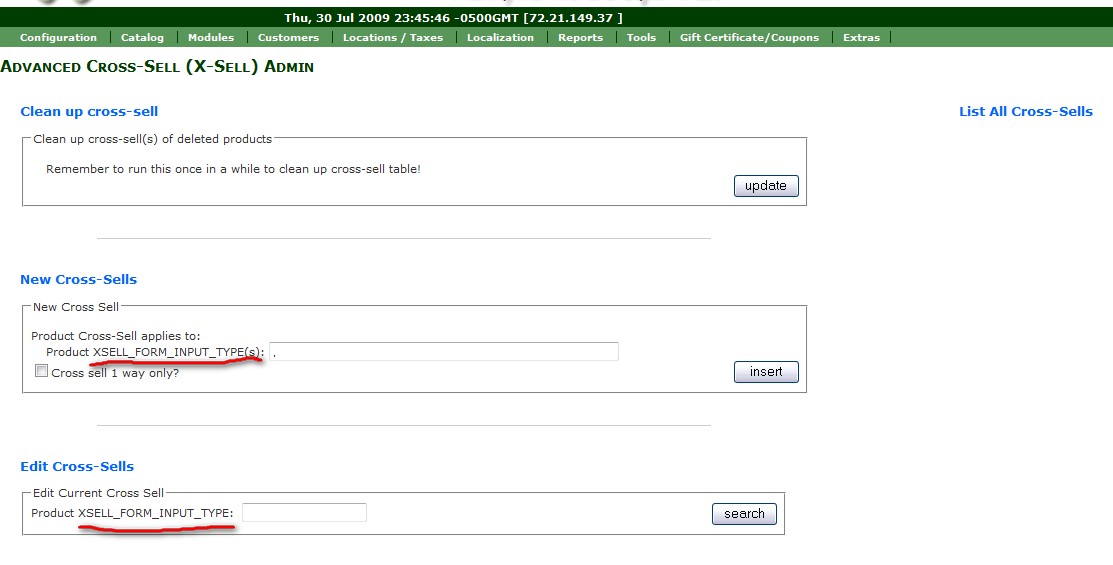
I do see: "Admin->Catalog->Advanced Cross-Sell" but with errors...ex:
Product Cross-Sell applies to:
Product XSELL_FORM_INPUT_TYPE(s):

Any help would be greatly appreciated. :lamo:

Thanks much,
Dario

27 Jul 2009, 7:09 PM
#527
pandax1024 avatar

pandax1024

New Zenner

Join Date:
Jul 2009
Posts:
2
Plugin Contributions:
0

Re: Just another Cross-Sell mod (support thread)

Hi all, I have installed Cross-Sell but it showed

1146 Table 'chewhair_haircareproducts.products_xsell' doesn't exist
in:
[select distinct p.products_id, p.products_image, pd.products_name from products_xsell xp, products p, products_description pd where xp.products_id = '107' and xp.xsell_id = p.products_id and p.products_id = pd.products_id and pd.language_id = '1' and p.products_status = 1 order by rand() limit 6]

one more
Admin->configuration->did not show"cross sell"

Hope yours can help me.:(

28 Jul 2009, 4:42 PM
#528
batteryman avatar

batteryman

Zen Follower

Join Date:
Jul 2004
Location:
Las Vegas
Posts:
327
Plugin Contributions:
0

Re: Just another Cross-Sell mod (support thread)

pandax1024:

Hi all, I have installed Cross-Sell but it showed

1146 Table 'chewhair_haircareproducts.products_xsell' doesn't exist
in:
[select distinct p.products_id, p.products_image, pd.products_name from products_xsell xp, products p, products_description pd where xp.products_id = '107' and xp.xsell_id = p.products_id and p.products_id = pd.products_id and pd.language_id = '1' and p.products_status = 1 order by rand() limit 6]

one more
Admin->configuration->did not show"cross sell"

Hope yours can help me.:(

Do you have Module Manager installed? If so did you go to it and have it install the sql for cross sell?

29 Jul 2009, 4:10 PM
#529
belaze avatar

belaze

New Zenner

Join Date:
Dec 2006
Posts:
84
Plugin Contributions:
0

Re: Just another Cross-Sell mod (support thread)

batteryman:

Do you have Module Manager installed? If so did you go to it and have it install the sql for cross sell?

Hi,
I guess my problem is the same as above where I don't see Cross Sell in the Admin =>Config.

I did go to Mudule Manager and clicked on "Install new modules: Click Here" ... with the following results: "Found and attempted to install 0 new modules."

Please help.

Thanks much.
Dario

31 Jul 2009, 4:53 AM
#530
aatech avatar

aatech

New Zenner

Join Date:
Dec 2006
Posts:
87
Plugin Contributions:
0

Re: Just another Cross-Sell mod (support thread)

belaze:

Hi,
I am having a bit of problem with this mod, I uploaded all the files into their rightful folders and edited the required files...

When I go to the admin section I don't see "Admin->configuration->cross sell".

I do see: "Admin->Catalog->Advanced Cross-Sell" but with errors...ex:
Product Cross-Sell applies to:
Product XSELL_FORM_INPUT_TYPE(s):

Any help would be greatly appreciated. :lamo:

Thanks much,
Dario

We are having the same problem...
What shows in the admin section is:

Product XSELL_FORM_INPUT_TYPE(s):

We checked all the Language files and everything is there???
See attached Photo...

Thank you all in advance..
31 Jul 2009, 5:24 AM
#531
aatech avatar

aatech

New Zenner

Join Date:
Dec 2006
Posts:
87
Plugin Contributions:
0

Re: Just another Cross-Sell mod (support thread)

AATECH:

We are having the same problem...
What shows in the admin section is:

Product XSELL_FORM_INPUT_TYPE(s):

We checked all the Language files and everything is there???
See attached Photo...

Thank you all in advance..

Never mind... It looks like 1.SQL was never ran with the Module Manager... So I ran it in the Admin Sql

SET @t4=0;
SELECT (@t4:=configuration_group_id) as t4
FROM configuration_group
WHERE configuration_group_title= 'Cross Sell';
DELETE FROM configuration WHERE configuration_group_id = @t4;
DELETE FROM configuration_group WHERE configuration_group_id = @t4;

INSERT INTO configuration_group VALUES ('', 'Cross Sell', 'Set Cross Sell Options', '1', '1');
UPDATE configuration_group SET sort_order = last_insert_id() WHERE configuration_group_id = last_insert_id();

SET @t4=0;
SELECT (@t4:=configuration_group_id) as t4
FROM configuration_group
WHERE configuration_group_title= 'Cross Sell';

UPDATE configuration SET configuration_group_id = @t4 WHERE configuration_key IN ('MIN_DISPLAY_XSELL','MAX_DISPLAY_XSELL','SHOW_PRODUCT_INFO_COLUMNS_XSELL_PRODUCTS','XSELL_DISPLAY_PRICE');

INSERT INTO configuration (configuration_id, configuration_title, configuration_key, configuration_value, configuration_description, configuration_group_id, sort_order, last_modified, date_added, use_function, set_function) VALUES
('', 'Input type to be used in form', 'XSELL_FORM_INPUT_TYPE', 'model', 'Choose to use product ID or MODEL as your input type. Check readme file for more info', @t4, 1, NOW(), NOW(), NULL, 'zen_cfg_select_option(array('id', 'model'),');

INSERT INTO configuration (configuration_id, configuration_title, configuration_key, configuration_value, configuration_description, configuration_group_id, sort_order, last_modified, date_added, use_function, set_function) VALUES
('', 'XSell Product Input Separator', 'XSELL_PRODUCT_INPUT_SEPARATOR', ',', 'You will need to insert all product id/model you want to cross-sell in 1 field, so each product id/model needs to be separated by a separator. The default is comma, choose another if you want to', @t4, 1, NOW(), NOW(), NULL, NULL);

INSERT INTO configuration (configuration_id, configuration_title, configuration_key, configuration_value, configuration_description, configuration_group_id, sort_order, last_modified, date_added, use_function, set_function) VALUES
('', 'XSell Sort Order', 'XSELL_SORT_ORDER', 'sort_order', 'Sometimes you may want to display the xsell products randomly, especially if each product xsells with lots of others', @t4, 1, NOW(), NOW(), NULL, 'zen_cfg_select_option(array('sort_order', 'random'),');

Hope it helps someone...

1 Aug 2009, 5:24 AM
#532
belaze avatar

belaze

New Zenner

Join Date:
Dec 2006
Posts:
84
Plugin Contributions:
0

Re: Just another Cross-Sell mod (support thread)

AATECH:

Never mind... It looks like 1.SQL was never ran with the Module Manager... So I ran it in the Admin Sql

SET @t4=0;
SELECT (@t4:=configuration_group_id) as t4
FROM configuration_group
WHERE configuration_group_title= 'Cross Sell';
DELETE FROM configuration WHERE configuration_group_id = @t4;
DELETE FROM configuration_group WHERE configuration_group_id = @t4;

INSERT INTO configuration_group VALUES ('', 'Cross Sell', 'Set Cross Sell Options', '1', '1');
UPDATE configuration_group SET sort_order = last_insert_id() WHERE configuration_group_id = last_insert_id();

SET @t4=0;
SELECT (@t4:=configuration_group_id) as t4
FROM configuration_group
WHERE configuration_group_title= 'Cross Sell';

UPDATE configuration SET configuration_group_id = @t4 WHERE configuration_key IN ('MIN_DISPLAY_XSELL','MAX_DISPLAY_XSELL','SHOW_PRODUCT_INFO_COLUMNS_XSELL_PRODUCTS','XSELL_DISPLAY_PRICE');

INSERT INTO configuration (configuration_id, configuration_title, configuration_key, configuration_value, configuration_description, configuration_group_id, sort_order, last_modified, date_added, use_function, set_function) VALUES
('', 'Input type to be used in form', 'XSELL_FORM_INPUT_TYPE', 'model', 'Choose to use product ID or MODEL as your input type. Check readme file for more info', @t4, 1, NOW(), NOW(), NULL, 'zen_cfg_select_option(array('id', 'model'),');

INSERT INTO configuration (configuration_id, configuration_title, configuration_key, configuration_value, configuration_description, configuration_group_id, sort_order, last_modified, date_added, use_function, set_function) VALUES
('', 'XSell Product Input Separator', 'XSELL_PRODUCT_INPUT_SEPARATOR', ',', 'You will need to insert all product id/model you want to cross-sell in 1 field, so each product id/model needs to be separated by a separator. The default is comma, choose another if you want to', @t4, 1, NOW(), NOW(), NULL, NULL);

INSERT INTO configuration (configuration_id, configuration_title, configuration_key, configuration_value, configuration_description, configuration_group_id, sort_order, last_modified, date_added, use_function, set_function) VALUES
('', 'XSell Sort Order', 'XSELL_SORT_ORDER', 'sort_order', 'Sometimes you may want to display the xsell products randomly, especially if each product xsells with lots of others', @t4, 1, NOW(), NOW(), NULL, 'zen_cfg_select_option(array('sort_order', 'random'),');

Hope it helps someone...

THANKS MUCH...THAT WAS A BIGG HELP! :clap:
Now its working.

15 Aug 2009, 2:01 AM
#533
masterrusty avatar

masterrusty

Zen Follower

Join Date:
Mar 2007
Location:
Oregon
Posts:
152
Plugin Contributions:
0

Re: Just another Cross-Sell mod (support thread)

I have installed the MOD, and added some Cross Sell items.

The MOD appeared fine in the "Module Manager."

"Cross Sell" configuration settings work fine in the Configuration menu; and

The "Advanced Cross Sell" module seemed to work fine in the "Catalog" menu. I entered items, and received positive confirmation of the entries. I can even return to the Module and edit the cross sell items.

My problem is that the items are not showing up on the product pages.

Here is the a link to one of the products.
http://riversidelandsale.com/index.php?main_page=product_info&cPath=249_2&products_id=4292

15 Aug 2009, 2:53 PM
#534
dharma avatar

dharma

Totally Zenned

Join Date:
Nov 2006
Posts:
505
Plugin Contributions:
0

Re: Just another Cross-Sell mod (support thread)

Again thank you for this fantastic contribution!

I wanted to suggest, perhaps in a future version the ability to cross sell on the shopping cart page.

15 Aug 2009, 5:23 PM
#535
batteryman avatar

batteryman

Zen Follower

Join Date:
Jul 2004
Location:
Las Vegas
Posts:
327
Plugin Contributions:
0

Re: Just another Cross-Sell mod (support thread)

dharma:

Again thank you for this fantastic contribution!

I wanted to suggest, perhaps in a future version the ability to cross sell on the shopping cart page.

To do this it really easy... 2 steps which are already outlined in his install instructions.. I will display all instructions to help show you..

=========================
INSTALLATION INSTRUCTIONS

BACK UP BACK UP BACK UP
  1. This module needs another module called module_manager to operate properly.
    http://code.google.com/p/zencart-module-manager/downloads/list

  2. Make sure to change the name of the following directories (from the ZIP) to match your template name:
    /includes/modules/YOUR_TEMPLATE
    /includes/templates/YOUR_TEMPLATE
    /includes/languages/english/YOUR_TEMPLATE

  3. Upload all supplied files in their approporiate folder structure... EXCEPT for the following:
    /includes/templates/YOUR_TEMPLATE/templates/SAMPLE_ADDITION_TO_tpl_product_info_display_TEMPLATE_FILE.php
    /includes/languages/english/YOUR_TEMPLATE/SAMPLE_ADDITIONS_TO_product_info_LANGUAGE_FILE.php
    If you upload these example files, you may encounter template error messages due to the way overrides grab files.

    (Do not upload the install.txt or products_xsell.sql files, as they are not needed on the server.)

4. Open includes/languages/english/product_info.php
or includes/languages/english/YOUR_TEMPLATE/product_info.php
and add:
define('TEXT_XSELL_PRODUCTS', 'We Also Recommend :');
just above the final ?> and save it into includes/languages/english/YOUR_TEMPLATE/product_info.php

The SAMPLE_ADDITIONS_TO_product_info_LANGUAGE_FILE.php can be used for this by copying its contents into product_info.php

4.b. - Repeat step 4 for each of the other product types you intend to use (ie: product_music_info, document_general_info, etc).

5. Now edit your product-info template file (tpl_product_info_display.php) and insert the following code
at the point where you wish the Cross-Sell box to appear. Usually best at the end of the file:

<?php require($template->get_template_dir('tpl_modules_xsell_products.php', DIR_WS_TEMPLATE, $current_page_base,'templates'). '/' . 'tpl_modules_xsell_products.php'); ?>

The SAMPLE_ADDITION_TO_tpl_product_info_display_TEMPLATE_FILE.php contains this same code, and you can copy/paste
from that file into your customized tpl_product_info_display.php

5.b. Repeat step 5 for any other product types for which you wish to enable cross-sell display.
(ie: tpl_product_music_info_display.php, etc)

  1. Upload your changes from step 4 / 4.b and step 5 / 5.b to your server.

Installation done.

I highlighted the two steps that we are repeating to accomplish this for the shopping cart page

Step 4
Paste this code:

define('TEXT_XSELL_PRODUCTS', 'We Also Recommend :');

into this file, changing YOUR_TEMPLATE to your own of course:

/includes/languages/english/YOUR_TEMPLATE/shopping_cart.php

**Step 5.
**Paste this code:

<?php require($template->get_template_dir('tpl_modules_xsell_products.php', DIR_WS_TEMPLATE, $current_page_base,'templates'). '/' . 'tpl_modules_xsell_products.php'); ?>

into this file, changing YOUR_TEMPLATE to your own of course:

/includes/templates/YOUR_TEMPLATE/templates/tpl_shopping_cart_default.php

Thats it and now you have you Cross Sell on the Shopping Cart Page. The only thing is make sure you place the Step 5 code into a section on the tpl_shopping_cart_default.php that is not a long if statement that is broken up by several php tags. Not sure what that is called, But dont do it.

15 Aug 2009, 10:48 PM
#536
dharma avatar

dharma

Totally Zenned

Join Date:
Nov 2006
Posts:
505
Plugin Contributions:
0

Re: Just another Cross-Sell mod (support thread)

Thanks for the info!

I gave it a shot, and this method works, but on my cart it requires the old upsell/xsell mod (Merlin 2006) to work...do you have that installed too? or just the code above with yacsm?

and are cross sell items on the shopping cart page limited only to 3 columns max? mine appear to be spaced for 4 but maxed out at 3 (no matter what I change in admin, cart_upsell.php settings or css

16 Aug 2009, 12:00 AM
#537
batteryman avatar

batteryman

Zen Follower

Join Date:
Jul 2004
Location:
Las Vegas
Posts:
327
Plugin Contributions:
0

Re: Just another Cross-Sell mod (support thread)

I only have the current version of Advanced Cross Sell.. However I use a modified version of it which I use Jquery with to give it the product the ability to slide if there are more than the min.

You can see how I use it on my site at http://biaf.com/?i=4413

17 Aug 2009, 2:33 PM
#538
autoace avatar

autoace

Totally Zenned

Join Date:
Jun 2009
Posts:
618
Plugin Contributions:
0

Re: Just another Cross-Sell mod (support thread)

Hello:

I am about to install this addon; Cross Sell - Just Another Cross Sell Mod version: rev186 and have one question.

Do I need to run the the SQL command given in the installation instructions. I do not have rev185 installed, this will be my first installation of this addon.

I do have module mananger installed.

Thank you.

17 Aug 2009, 3:11 PM
#539
autoace avatar

autoace

Totally Zenned

Join Date:
Jun 2009
Posts:
618
Plugin Contributions:
0

Re: Just another Cross-Sell mod (support thread)

Hi,

It seems that I have installed Cross Sell - Just Another Cross Sell Mod successfully! Cross Sell does show in my Config Menu and and when I clicked to install new modules in my Module Manager, it successfully processed the SQL commands.

Further, when I clicked on 'List all modules" this came up:

2 ri_jaxs 1 Revision 185 update

My only question is that I thought that I had installed rev186? Is that where the SQL command in the instructions comes into play? Do I need to run that SQL command to have rev186 working?

Thanks in advance.

17 Aug 2009, 6:54 PM
#540
masterrusty avatar

masterrusty

Zen Follower

Join Date:
Mar 2007
Location:
Oregon
Posts:
152
Plugin Contributions:
0

Re: Just another Cross-Sell mod (support thread)

masterrusty:

I have installed the MOD, and added some Cross Sell items.

The MOD appeared fine in the "Module Manager."

"Cross Sell" configuration settings work fine in the Configuration menu; and

The "Advanced Cross Sell" module seemed to work fine in the "Catalog" menu. I entered items, and received positive confirmation of the entries. I can even return to the Module and edit the cross sell items.

My problem is that the items are not showing up on the product pages.

Here is the a link to one of the products.
http://riversidelandsale.com/index.php?main_page=product_info&cPath=249_2&products_id=4292

I just wanted to add that I made the changes to the template files. But this mod still does not show up on the live site.