Zen Cart Logo
Forums / All Other Contributions/Addons / AJAX IMAGE Swapper support thread

AJAX IMAGE Swapper support thread

Views: 172,482

Results 161 to 180 of 786
21 May 2008, 04:49
#161
weber avatar

weber

Zen Follower

Join Date:
Nov 2005
Posts:
157
Plugin Contributions:
0

AJAX IMAGE Swapper support thread

one of my suggestion is: why not hide the other two upload field?

to make the module easy to use...we can highlight the pic_title field in case it's just blank...

one question: where to change the mouse click to mouse over the swap the images? any idea to preload the images?

21 May 2008, 16:15
#162
alillowr avatar

alillowr

New Zenner

Join Date:
Apr 2008
Posts:
32
Plugin Contributions:
0

Re: AJAX IMAGE Swapper support thread

dbltoe:

Note in the text where it says zen_configuration_group, the zen_ is a prefix that you may need to change or remove completely depending on the prefix of YOUR database tables.

I am having the same issues as shocker in the begining of this thread where I can see the name image swapper under configuration but no where else in the zen admin site. I found this solution but my newb question is. How or where do I find out what the prefix of MY database tables is? Would that be my sql database name?

21 May 2008, 18:07
#163
greydawgjr avatar

greydawgjr

New Zenner

Join Date:
May 2008
Posts:
65
Plugin Contributions:
0

Re: AJAX IMAGE Swapper support thread

alillowr:

I am having the same issues as shocker in the begining of this thread where I can see the name image swapper under configuration but no where else in the zen admin site. I found this solution but my newb question is. How or where do I find out what the prefix of MY database tables is? Would that be my sql database name?

You can find the name of your database prefix by looking at the configure.php file under Admin->Includes then configure.php. Look for the line that says:
define('DB_PREFIX', '');

If yours is empty like the line above then it's on the default prefix and Jay's db script should work fine, if not you'll need to change it according to dbltoes instructions (haven't tried that myself but it looked like other people had had success with it)

I was experiencing the same problem as you, turned out that I had mis-copied some files into the wrong directories so you may want to double check as well.

22 May 2008, 01:57
#164
alillowr avatar

alillowr

New Zenner

Join Date:
Apr 2008
Posts:
32
Plugin Contributions:
0

Re: AJAX IMAGE Swapper support thread

greydawgjr:

You can find the name of your database prefix by looking at the configure.php file under Admin->Includes then configure.php. Look for the line that says:
define('DB_PREFIX', '');

If yours is empty like the line above then it's on the default prefix and Jay's db script should work fine, if not you'll need to change it according to dbltoes instructions (haven't tried that myself but it looked like other people had had success with it)

I was experiencing the same problem as you, turned out that I had mis-copied some files into the wrong directories so you may want to double check as well.

I checked the file and it is blank empty like the line above define('DB_PREFIX', ''); You had said that you had mis-copied some files into the wrong directories. Here is what I did when I uploaded all of the files. In the readme it says just to copy all of the files to the root directory so I uploaded all of the files to my stores root ex. mydomain/store

Was there a specific place that I am supposed to upload certain files? What do I need to move and to where?

22 May 2008, 02:42
#165
jaycode avatar

jaycode

Zen Follower

Join Date:
Jun 2007
Location:
Australia - Melbourne
Posts:
306
Plugin Contributions:
1

Re: AJAX IMAGE Swapper support thread

[quote=weber;559868]one of my suggestion is: why not hide the other two upload field?[quote]

The other two upload fields are needed in case you need to upload different images for medium and large image (which is recommended by the way)

weber:

to make the module easy to use...we can highlight the pic_title field in case it's just blank...

To make it even easier to use, when it is blank and you set an image to be uploaded, it will be automatically filled with filename.

weber:

one question: where to change the mouse click to mouse over the swap the images? any idea to preload the images?

css file? preloading images might require more javascript changes, anybody interested in doing this? :D

22 May 2008, 02:44
#166
jaycode avatar

jaycode

Zen Follower

Join Date:
Jun 2007
Location:
Australia - Melbourne
Posts:
306
Plugin Contributions:
1

Re: AJAX IMAGE Swapper support thread

greydawgjr:

You can find the name of your database prefix by looking at the configure.php file under Admin->Includes then configure.php. Look for the line that says:
define('DB_PREFIX', '');

If yours is empty like the line above then it's on the default prefix and Jay's db script should work fine, if not you'll need to change it according to dbltoes instructions (haven't tried that myself but it looked like other people had had success with it)

I was experiencing the same problem as you, turned out that I had mis-copied some files into the wrong directories so you may want to double check as well.

Well you don't actually need to do that anymore prior to v.3.0 and later. just simply copy the SQL:smile:

22 May 2008, 02:46
#167
jaycode avatar

jaycode

Zen Follower

Join Date:
Jun 2007
Location:
Australia - Melbourne
Posts:
306
Plugin Contributions:
1

Re: AJAX IMAGE Swapper support thread

alillowr:

I checked the file and it is blank empty like the line above define('DB_PREFIX', ''); You had said that you had mis-copied some files into the wrong directories. Here is what I did when I uploaded all of the files. In the readme it says just to copy all of the files to the root directory so I uploaded all of the files to my stores root ex. mydomain/store

Was there a specific place that I am supposed to upload certain files? What do I need to move and to where?

Overwrite the previous folders in your root files -> admin, includes, etc. folders that is

22 May 2008, 02:47
#168
oakwood avatar

oakwood

New Zenner

Join Date:
May 2008
Posts:
85
Plugin Contributions:
0

Re: AJAX IMAGE Swapper support thread

jaycode:

Just making sure... have you added the images?

Yes, I uploaded the images. Just to make sure, where are we supposed to upload them to?

22 May 2008, 02:49
#169
jaycode avatar

jaycode

Zen Follower

Join Date:
Jun 2007
Location:
Australia - Melbourne
Posts:
306
Plugin Contributions:
1

Re: AJAX IMAGE Swapper support thread

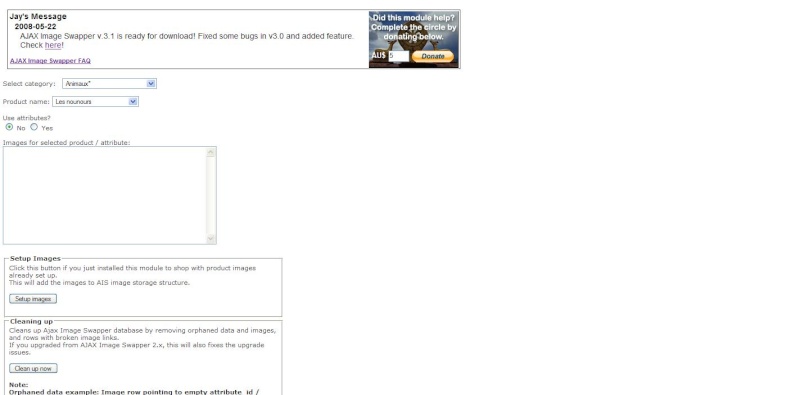
Updated version ready!!:clap:

AJAX Image Swapper v.3.1.

Now added with "Setup Images" button - Now if you install this module to a working site, you don't need to re-setup the images, simply click the button and trust all is well :wink:

FAQ page ready - its way easier to look for answer in the FAQ than forum I suppose? Check it out here.

22 May 2008, 03:08
#170
alillowr avatar

alillowr

New Zenner

Join Date:
Apr 2008
Posts:
32
Plugin Contributions:
0

Re: AJAX IMAGE Swapper support thread

jaycode:

Overwrite the previous folders in your root files -> admin, includes, etc. folders that is

When I had uploaded the files it did ask me if I wanted to overwrite the files/folders and I did accept. So they where overwritten.

Any other suggestions to help my issue?

22 May 2008, 03:16
#171
greydawgjr avatar

greydawgjr

New Zenner

Join Date:
May 2008
Posts:
65
Plugin Contributions:
0

Re: AJAX IMAGE Swapper support thread

jaycode:

Overwrite the previous folders in your root files -> admin, includes, etc. folders that is

Hi Jay,
I've got a question about this myself... Do you mean literally overwrite the (zencart) admin folder with the admin folder in the module, or just copy the files from admin to admin?

I've got the module working on my local machine with the exception of the image resizing. The image I upload to Small is the same image used in small, medium and large. I can see the image in the small, medium and large size and they are the proper pixel size, however it's the same file that's loading in each section, whereas on the demo site I see three separate files loading on yours.

I'm excited to see you have an update, I'll try that out tonight and see if that fixes things for me but if you have any ideas I'd love to hear them!

22 May 2008, 06:04
#172
jaycode avatar

jaycode

Zen Follower

Join Date:
Jun 2007
Location:
Australia - Melbourne
Posts:
306
Plugin Contributions:
1

Re: AJAX IMAGE Swapper support thread

Oakwood:

Yes, I uploaded the images. Just to make sure, where are we supposed to upload them to?
The small / default size input. You might want to try with the latest version since I fixed some bugs there

22 May 2008, 06:09
#173
jaycode avatar

jaycode

Zen Follower

Join Date:
Jun 2007
Location:
Australia - Melbourne
Posts:
306
Plugin Contributions:
1

Re: AJAX IMAGE Swapper support thread

greydawgjr:

Hi Jay,
I've got a question about this myself... Do you mean literally overwrite the (zencart) admin folder with the admin folder in the module, or just copy the files from admin to admin?

I've got the module working on my local machine with the exception of the image resizing. The image I upload to Small is the same image used in small, medium and large. I can see the image in the small, medium and large size and they are the proper pixel size, however it's the same file that's loading in each section, whereas on the demo site I see three separate files loading on yours.

I'm excited to see you have an update, I'll try that out tonight and see if that fixes things for me but if you have any ideas I'd love to hear them!

Well any of those will do, since this module doesn't have any overlapping file anyway - which is the best part of this module:wink:

Yes that problem you mentioned has been covered in the FAQ you can't upload images with different cases in its filename.

22 May 2008, 06:20
#174
greydawgjr avatar

greydawgjr

New Zenner

Join Date:
May 2008
Posts:
65
Plugin Contributions:
0

Re: AJAX IMAGE Swapper support thread

I downloaded v3.1.1 and tried installing it to a fresh zencart installation and got the following error:

1064 You have an error in your SQL syntax; check the manual that corresponds to your MySQL server version for the right syntax to use near '/** UNINSTALLATION SET @t4=0' at line 1
in:
[/** * AJAX Image Swapper v3.1 * * @author Jaycode ([email protected]) * @license http://www.zen-cart.com/license/2_0.txt GNU Public License V2.0 / /* * Fual Slimbox for Zen v0.1.5 * * @author Brian Tyler ([email protected]) * @license http://www.zen-cart.com/license/2_0.txt GNU Public License V2.0 * @version $Id: slimbox_install.txt 2008-01-13 btyler $ / /* UNINSTALLATION SET @t4=0;]
If you were entering information, press the BACK button in your browser and re-check the information you had entered to be sure you left no blank fields.

It looks like you've got an opening comment ahead of uninstallation and then a closing comment tag at the end of the uninstall block, is this whole block intended to be commented out? I know mysql has had issues with multiline comments in the past and I don't think they've ever worked out a way to easily comment large blocks of code. In the time being deleting the uninstall section and then running the script worked fine.

Also noticed that clicking the faq link in Jay's message tries to load your site into that little frame so you may need to set some targets on your links!

Amazing work as always Jay! I inherited a zen cart site and wasn't too excited about it, mainly because I have no experience with zen cart until a few weeks ago but I think your module really unleashes its potential. When I'm able to use this on a production site we'll be maxing out your donation slider each time we use it :D

22 May 2008, 06:24
#175
greydawgjr avatar

greydawgjr

New Zenner

Join Date:
May 2008
Posts:
65
Plugin Contributions:
0

Re: AJAX IMAGE Swapper support thread

jaycode:

Yes that problem you mentioned has been covered in the FAQ you can't upload images with different cases in its filename.

I've been using alpha-numeric (test1, test2, etc) filenames so I wonder if that could be an issue too. I'll try it with just lowercase filenames. Thanks for your response!

22 May 2008, 20:40
#176
jaycode avatar

jaycode

Zen Follower

Join Date:
Jun 2007
Location:
Australia - Melbourne
Posts:
306
Plugin Contributions:
1

Re: AJAX IMAGE Swapper support thread

greydawgjr:

I downloaded v3.1.1 and tried installing it to a fresh zencart installation and got the following error:

1064 You have an error in your SQL syntax; check the manual that corresponds to your MySQL server version for the right syntax to use near '/** UNINSTALLATION SET @t4=0' at line 1
in:
[/** * AJAX Image Swapper v3.1 * * @author Jaycode ([email protected]) * @license http://www.zen-cart.com/license/2_0.txt GNU Public License V2.0 / /* * Fual Slimbox for Zen v0.1.5 * * @author Brian Tyler ([email protected]) * @license http://www.zen-cart.com/license/2_0.txt GNU Public License V2.0 * @version $Id: slimbox_install.txt 2008-01-13 btyler $ / /* UNINSTALLATION SET @t4=0;]
If you were entering information, press the BACK button in your browser and re-check the information you had entered to be sure you left no blank fields.

It looks like you've got an opening comment ahead of uninstallation and then a closing comment tag at the end of the uninstall block, is this whole block intended to be commented out? I know mysql has had issues with multiline comments in the past and I don't think they've ever worked out a way to easily comment large blocks of code. In the time being deleting the uninstall section and then running the script worked fine.

Which I had realised soon after uploading the update but I didn't change it cause it feels kinda awkward to launch new updates every 5 minutes :D

greydawgjr:

Also noticed that clicking the faq link in Jay's message tries to load your site into that little frame so you may need to set some targets on your links!

Ooops, thanks for letting me know!

greydawgjr:

Amazing work as always Jay! I inherited a zen cart site and wasn't too excited about it, mainly because I have no experience with zen cart until a few weeks ago but I think your module really unleashes its potential. When I'm able to use this on a production site we'll be maxing out your donation slider each time we use it :D

Wow thanks a lot man! That should make it faster for me to fulfill the development road map of AIS!

22 May 2008, 20:41
#177
jaycode avatar

jaycode

Zen Follower

Join Date:
Jun 2007
Location:
Australia - Melbourne
Posts:
306
Plugin Contributions:
1

Re: AJAX IMAGE Swapper support thread

greydawgjr:

I've been using alpha-numeric (test1, test2, etc) filenames so I wonder if that could be an issue too. I'll try it with just lowercase filenames. Thanks for your response!

Let me know if its working (or not) :)

23 May 2008, 06:23
#178
alillowr avatar

alillowr

New Zenner

Join Date:
Apr 2008
Posts:
32
Plugin Contributions:
0

Re: AJAX IMAGE Swapper support thread

jaycode:

Updated version ready!!:clap:

AJAX Image Swapper v.3.1.

Now added with "Setup Images" button - Now if you install this module to a working site, you don't need to re-setup the images, simply click the button and trust all is well :wink:

FAQ page ready - its way easier to look for answer in the FAQ than forum I suppose? Check it out here.

I tried purchasing this module from your site in hopes that it will work for me because v3.0 is giving me problems and is unusable, but when I go to confirm the order, it will take me to paypal with the following error:

We are unable to complete your request at this time. Please click Retry or try again later. We apologize for the inconvenience.

Message 3004

Is it not downloadable at this time?

23 May 2008, 14:45
#179
liliebrode avatar

liliebrode

New Zenner

Join Date:
Mar 2008
Posts:
16
Plugin Contributions:
0

Re: AJAX IMAGE Swapper support thread

Hello
Sorry for my english, I'm french
I have a problem with image swapper : I installed image swapper 3.0 which was OK, but I wanted to install the 3.1.
Since, I had to reinstall all my zencart ( I must have done something wrong.. :P )
But now, image swapper 3.1 is installed, and I don't find how to insert photo of my objects...
here is what I have :

Before ( with 3.0 ), I had boxes where I could insert the files, but now, with 3.1, I have nothing. There is a big gap on the right side of my page

Did I do something wrong ? must I change something on the configuration of zencart ?
Many thanks

23 May 2008, 19:25
#180
greydawgjr avatar

greydawgjr

New Zenner

Join Date:
May 2008
Posts:
65
Plugin Contributions:
0

Re: AJAX IMAGE Swapper support thread

liliebrode:

Before ( with 3.0 ), I had boxes where I could insert the files, but now, with 3.1, I have nothing. There is a big gap on the right side of my page

Did I do something wrong ? must I change something on the configuration of zencart ?
Many thanks

The right side of the page is going to be blank until you select the Yes radio button under use attributes! Also, if you're on a fresh install of zen cart remember you will need to have your attributes built before you can select them...