Zen Cart Logo

Quickbook Sync

Views: 91,783

Results 221 to 240 of 283
28 Sep 2010, 7:07 PM
#221
bpryor avatar

bpryor

New Zenner

Join Date:
Sep 2009
Posts:
48
Plugin Contributions:
0

Quickbook Sync

bpryor:

Thanks for the lead. I'll try that and report back if it works.

Thanks again for the idea but unfortunately it didn't fix it. Time to try a new host.

Bill

5 Nov 2010, 11:07 PM
#222
bizcatalyst avatar

bizcatalyst

New Zenner

Join Date:
Oct 2009
Posts:
13
Plugin Contributions:
0

Re: Quickbook Sync

Hello,
I've got this mod working to update quickbooks for orders done at peacemonger.org, but there seems to be an intermittent issue that I'm hoping someone can help with. There are times when customer info gets transferred to quickbooks but the order info is missing for their order. I checked the logs and found the following errors that I suspect are related to this:
Error:There is an invalid reference to QuickBooks ItemSalesTax "CA TAX 9%:"
in the SalesReceipt.

and

Error:There is an invalid reference to QuickBooks PaymentMethod "Check/Money
Order" in the SalesReceipt.

I remember having a setup issue where I had to match the exact COGS account name in quickbooks or something didn't transfer, is this the same type of issue? Does it mean that the quickbooks ItemSalesTax object named CA TAX 9% has to be created and the quickbooks payment method called Check/Money Order has to be created in order for these transactions to be transferred?
Thanks,
Robert

6 Nov 2010, 10:27 PM
#223
srturner47 avatar

srturner47

Zen Follower

Join Date:
Oct 2007
Posts:
385
Plugin Contributions:
0

Re: Quickbook Sync

Does it mean that the quickbooks ItemSalesTax object named CA TAX 9% has to be created

Actually, as currently setup, you need to create one called CA TAX 9%: colon and all.

However, a better way to do this, not requiring a colon, is to go to Admin->Tools->QBSync Matching and then just match it to whatever you want in QB.

and the quickbooks payment method called Check/Money Order has to be created in order for these transactions to be transferred?

Yup, as currently setup.

But again, a better way to do this is to go to Admin->Tools->QBSync Matching and then just match it to whatever you want in QB.

24 Nov 2010, 5:51 PM
#224
ksookma avatar

ksookma

Zen Follower

Join Date:
Aug 2009
Posts:
212
Plugin Contributions:
1

Re: Quickbook Sync

I'm hoping someone can help me with this. I was able to get everything setup and was able to sync the customer data and products. I can't sync orders in to quickbooks though for some reason. I took a look at the logs and did notice that there were errors in there such as:

Error:There is an invalid reference to QuickBooks Term "Visa" in the Invoice.

I believe I also get errors related to the shipping but i could not find one when i went back to look.

Upon reviewing the forum here I figured that I needed to put something like {payment} under payment method/terms and a * under zen cart but that just generated errors saying that it didnt understand {payment}.

I know that I need to match quickbooks accounts with zencart in some way but can't seem to figure it out. also im using quickbooks 2011 if that matters at all.

I guess i just need to figure out what i need to create in quickbooks and what to enter in the quickbooks sync match. Thank you in advanced for the help :dontgetit

27 Nov 2010, 5:42 AM
#225
filmlover7 avatar

filmlover7

New Zenner

Join Date:
Nov 2010
Posts:
21
Plugin Contributions:
0

Re: Quickbook Sync

Hello all Zen to Quickbooks experimenters!
I am unclear... is it possible to export an IIF for importing into QuickBooks?

If so, can someone explain the abc's of the process please?

Thank you so much.

BTW, this seems like such a useful integration, I am surprised to read all of the posts on the subject without a clear solution.

Maybe when folks figure it out they stop posting... In any case, I would like to know how to integrate zen cart with QB.

27 Dec 2010, 8:42 PM
#226
mikestaps avatar

mikestaps

Zen Follower

Join Date:
Aug 2010
Location:
Grand Blanc, MI
Posts:
305
Plugin Contributions:
1

Re: Quickbook Sync

A quick question (for anyone using this mod) b4 I install this mod,
When importing as Invoice does this assign invoice #'s inline with what I already have? or does it use the web-order # as the invoice#?
Thanks

28 Dec 2010, 3:41 PM
#227
mdegrandis avatar

mdegrandis

New Zenner

Join Date:
Jun 2008
Location:
Oregon
Posts:
60
Plugin Contributions:
0

Re: Quickbook Sync

mikestaps:

A quick question (for anyone using this mod) b4 I install this mod,
When importing as Invoice does this assign invoice #'s inline with what I already have? or does it use the web-order # as the invoice#?
Thanks

It uses the zen cart order id.

Quickbooks will then increment by one on the next invoice from quickbooks.

If you want to use both this mod, and selling to walk ins... or another channel, you'll want to put some thought into avoiding duplicate invoice numbers.

28 Dec 2010, 3:47 PM
#228
mikestaps avatar

mikestaps

Zen Follower

Join Date:
Aug 2010
Location:
Grand Blanc, MI
Posts:
305
Plugin Contributions:
1

Re: Quickbook Sync

mdegrandis:

It uses the zen cart order id.

Quickbooks will then increment by one on the next invoice from quickbooks.

If you want to use both this mod, and selling to walk ins... or another channel, you'll want to put some thought into avoiding duplicate invoice numbers.

Bummer, the boss only wants inline invoice numbering... as we have probably 70% of our business from call-in's.
If anyone knows of another mod, or even a commercial app that would do this please PM me as to not hijack this thread.
Thanks

20 Jan 2011, 4:37 PM
#229
ddezine avatar

ddezine

New Zenner

Join Date:
Jan 2011
Posts:
4
Plugin Contributions:
0

Re: Quickbook Sync

I just installed the Quickbooks Sync, and it appears to be working. I was able to sync my products. However, none of my customers or orders went over to Quickbooks. I have read over the install instructions several times, but I am sure it is something I am doing wrong.

I am using zencart version 1.38:wacko:

20 Jan 2011, 5:11 PM
#230
divavocals avatar

divavocals

Totally Zenned

Join Date:
Jan 2007
Location:
Los Angeles, California, United States
Posts:
10,011
Plugin Contributions:
3

Re: Quickbook Sync

srturner47:

If you really need help, I encourage you to hire someone with more expertise. I've done several installs and setups for this mod, and it only takes a couple of hours. Once the mod is setup right, it does work great. I have yet to find any bugs. :)
Note to self.. When ready to install this for new client site, contact sturner47 and save myself a HUGE headache by hiring an EXPERT to do this install for my client.. :laugh:

27 Jan 2011, 5:02 PM
#231
vaige avatar

vaige

New Zenner

Join Date:
Mar 2009
Posts:
43
Plugin Contributions:
0

Re: Quickbook Sync

hi, need help on this one..
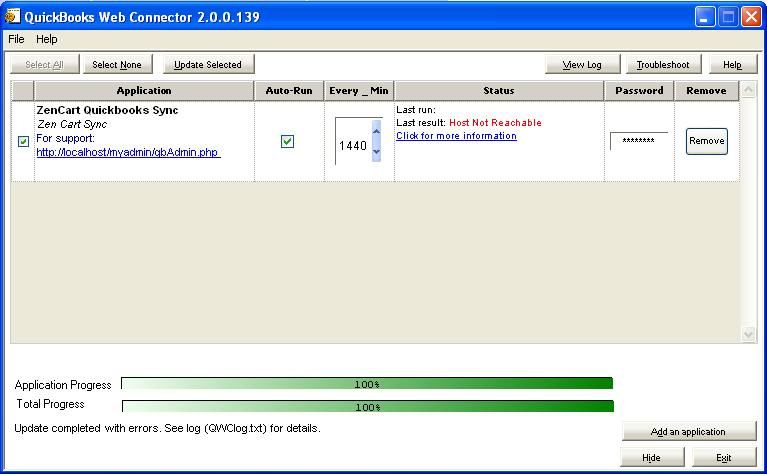
i wasn't able to connect the web connector to sync.
here's what i get..

Quickbooks Web Connector Log
20110127.16:56:14 UTC : QBWebConnector.SOAPWebService.instantiateWebService() : Initiated connection to the following application.
20110127.16:56:14 UTC : QBWebConnector.SOAPWebService.instantiateWebService() : AppName: ZenCart Quickbooks Sync
20110127.16:56:14 UTC : QBWebConnector.SOAPWebService.instantiateWebService() : AppUniqueName (if available): ZenCart Quickbooks Sync
20110127.16:56:14 UTC : QBWebConnector.SOAPWebService.instantiateWebService() : AppURL: https://localhost/qbServer.php
20110127.16:56:14 UTC : QBWebConnector.SOAPWebService.do_serverVersion() : *** Calling serverVersion().
20110127.16:56:15 UTC : QBWebConnector.SOAPWebService.do_serverVersion() : Error message: <Unable to connect to the remote server>. Update cannot continue.
20110127.16:56:15 UTC : QBWebConnector.RegistryManager.setUpdateLock() : HKEY_CURRENT_USER\Software\Intuit\QBWebConnector\UpdateLock has been set to False
20110127.16:56:15 UTC : QBWebConnector.RegistryManager.setUpdateLock() : ********************* Update session unlocked *********************
20110127.16:56:15 UTC : QBWebConnector.WebServiceManager.DoUpdateSelected() : Update completed with errors. See log (QWClog.txt) for details.


My QWC Configuration

<?xml version="1.0"?> <QBWCXML> <AppName>ZenCart Quickbooks Sync</AppName> <AppID></AppID> <AppURL>https://localhost/qbServer.php</AppURL> <AppDescription>Zen Cart Sync</AppDescription> <AppSupport>http://localhost/myadmin/qbAdmin.php</AppSupport> <UserName>admin</UserName> <OwnerID>{CD8D6B56-9AF2-11DD-ACC9-5D4756D89593}</OwnerID> <FileID>{DE1D7660-9AF2-11DD-8D53-5A4856D89593}</FileID> <QBType>QBFS</QBType> <Scheduler> <RunEveryNMinutes>1440</RunEveryNMinutes> </Scheduler> </QBWCXML>

I am on localhost using wamp..

I cant figure it out....Please help? Thanks alot!!

16 Feb 2011, 2:30 AM
#232
exteeyou avatar

exteeyou

New Zenner

Join Date:
Feb 2011
Posts:
1
Plugin Contributions:
0

Re: Quickbook Sync

Ok I have a few things to ask....

  1. I get the errors below and I do not know how to resolve them, any help would be appreciated..

SimpleXMLElement Object
(
[QBXMLMsgsRq] => SimpleXMLElement Object
(
[@attributes] => Array
(
[onError] => continueOnError
)

        [CustomerQueryRq] => SimpleXMLElement Object
            (
                [FullName] => DOE,JOHN
            )

    )

)
49261df55015639bcc60cecd0782d090
02-15-11 05:09:55 PM
LOG SimpleXMLElement Object
(
[QBXMLMsgsRs] => SimpleXMLElement Object
(
[CustomerQueryRs] => SimpleXMLElement Object
(
[@attributes] => Array
(
[statusCode] => 500
[statusSeverity] => Warn
[statusMessage] => The query request has not been fully completed. There was a required element (quot;DOE,JOHNquot;) that could not be found in QuickBooks.
)

            )

    )

)
49261df55015639bcc60cecd0782d090
02-15-11 05:09:55 PM
ERROR Error:The query request has not been fully completed. There was a required element ("DOE,JOHN") that could not be found in QuickBooks.

  1. What are the items in Quickbooks Sync Match, and how am I supposed to configure them? There is little to no documentation on this provided in the zip file.

  2. I think it would be excellent to add a "cost of good" field to each product entry, and then have this carry over to Quickbooks. Right now I have to go into Quickbooks and edit each individual item and change its actual cost, this is proving to be very time consuming and a real pain. If there is a way of doing this automagically, please advise.

Otherwise, thanks for a great mod and I appreciate any help given.

6 Mar 2011, 7:15 PM
#233
modwerx avatar

modwerx

New Zenner

Join Date:
Jan 2009
Posts:
84
Plugin Contributions:
0

Re: Quickbook Sync

how would you go about removing/uninstalling the sql patch for this mod? things got a little screwy when trying to get it set up and im at a loss at how to fix it. i want to just start over with what i know now so i can get it working properly. ive already tried emptying the DB tables starting with quickbooks_ , started a new company file and setup quickbooks web connector again with no luck. im still getting errors and cant get anything to import.

16 Mar 2011, 12:53 AM
#234
totalsam avatar

totalsam

Zen Follower

Join Date:
Jan 2009
Posts:
126
Plugin Contributions:
0

Re: Quickbook Sync

Hey,

Having major probs with this mod at the mo.

For a start I have NO Admin->Config->Quickbooks Sync and tbh am confused as to why it is asking you to config in the ZC admin BEFORE you install. Even after install the config files aren't there (they don't appear to be in the download).

After this nothing will import (but thats no suprise if it's not configured really is it? :P

Any assistance would be greatly appreciated asap because this mod would make my life great.

Thanks

16 Mar 2011, 1:03 AM
#235
totalsam avatar

totalsam

Zen Follower

Join Date:
Jan 2009
Posts:
126
Plugin Contributions:
0

Re: Quickbook Sync

totalsam:

Hey,

Having major probs with this mod at the mo.

For a start I have NO Admin->Config->Quickbooks Sync and tbh am confused as to why it is asking you to config in the ZC admin BEFORE you install. Even after install the config files aren't there (they don't appear to be in the download).

After this nothing will import (but thats no suprise if it's not configured really is it? :P

Any assistance would be greatly appreciated asap because this mod would make my life great.

Thanks

Never mind - found the config tables... Forgot about my admin permissions needing updating.

16 Mar 2011, 2:33 PM
#236
totalsam avatar

totalsam

Zen Follower

Join Date:
Jan 2009
Posts:
126
Plugin Contributions:
0

Re: Quickbook Sync

Hello,

Have installed the mod onto my test site and the default sample quickbooks file and (I think) configured it.

Still having some problems however.

I have 5895 products in Zencart, 2965 have been imported into Quickbooks.

I have 6094 customers in Zencart, 7 with active orders, 3 have been imported (with the correct layout as prescribed in the ZC config).

I have 12 orders in Zencart, 0 of which have been imported into Quickbooks.

When I click update on the quickbooks webconnect I get the following log result (from ZC)

LOG	
User Started Session
17edbd0f83f440706e666e69d98b72f2
03-16-11 02:23:24 PM
LOG	
User Ended Session
17edbd0f83f440706e666e69d98b72f2
03-16-11 02:23:24 PM

And I have attached the rather long web connect log.

I also have the following settings on:

Title	Value	Action 
QBS - Customer Name ID Format	{firstname} {lastname} - ID {zc_customerid}	 
QBS - Order Number Format	WEB-{zc_orderid}	 
QBS - Customer Parent Item in Quickbooks	Website	 
QBS - Add Products to Quickbooks	0	 
QBS - Add Products as Inventory or Non-Inventory Part	1	 
QBS - Preferred Vendor of Products Added	0	 
QBS - Products Added as Taxable or Non-Taxable	2	 
QBS - Products Added With Special Price	1	 
QBS - Sales Receipts Pending	0	 
QBS - Orders Added to To Be Printed or To Be Emailed List	0	 
QBS - Items in Order Added as Taxable or Non-Taxable	0	 
QBS - Add Product Attributes to Orders	0	 
QBS - Add Order Comments	0	 
QBS - no tax in Zen Cart tax name for Quickbooks		 
QBS - Quickbooks Income Account	Sales	 
QBS - Quickbooks Cost of Goods Sold Account	Cost of Goods Sold	 
QBS - Quickbooks Asset Account	Inventory Asset	 
QBS - Quickbooks Product Markup	100	 
QBS - Log Limit	30	 
QBS - Email Errors	[email protected]	 
QBS - CS-Change Customers Name ID	1	 
QBS - CS-Change Customers Real Name	1	 
QBS - CS-Change Customers Company	1	 
QBS - CS-Change Customers Address	1	 
QBS - CS-Change Customers Email	1	 
QBS - CS-Change Customers Phone Number	1	 
QBS - CS-Change Customers Fax Number	1	 
QBS - CS-Change Customers Allow Customer Deletion	3	 
QBS - CS-Change Customers Continue to Sync When Changed in QB	1	 
QBS - CS-Change Products Model Number	1	 
QBS - CS-Change Products Sales Description	1	 
QBS - CS-Change Products Sales Price	1	 
QBS - CS-Change Products Purchase Description	1	 
QBS - CS-Change Products Purchase Cost	1	 
QBS - CS-Change Products Allow Product Deletion	3	 
QBS - CS-Change Products Continue to Sync When Changed in QB	1	 
QBS - CS-Change Orders Order Number	1	 
QBS - CS-Change Orders Allow Order Deletion	1	 
QBS - CS-Change Orders Continue to Sync When Changed in QB	0	 
QBS - MATCH-Match Customers in Quickbooks to Zen Cart	0	 
QBS - MATCH-Match Products in Quickbooks to Zen Cart	0	 
QBS - MATCH-Match Orders in Quickbooks to Zen Cart	0	

Has anyone got any idea why the sync is being so particular and why it isn't working.

16 Mar 2011, 7:44 PM
#237
totalsam avatar

totalsam

Zen Follower

Join Date:
Jan 2009
Posts:
126
Plugin Contributions:
0

Re: Quickbook Sync

Have looked into this further and found that although Zencart claims I have 6,000 odd products my DB says 3022 which I have now manages to successfully import with Quick Sync.

Looking into my database I can see I now have a table of quickbooks_que and this has 6091 queued "addCustomer" actions, and a couple of "addSalesReceipt" actions. Which I presume seeing as they are in a queue is why they aren't appearing in Quickbooks.

I have checked my logs and they again are showing nothing happening BUT I have a new QuickBooks Web Connector Log file (See attached). Anyone able to shed any light on this?

A quick scan of the word "fail" on the log produced the first error as this:

20110316.17:44:26 UTC	: QBWebConnector.SOAPWebService.do_sendRequestXML() : QBWC1041: SendRequestXML failed.
Error message: Client found response content type of 'text/html; charset=iso-8859-1', but expected 'text/xml'.
The request failed with the error message:
--
<div class="systemError">1064 You have an error in your SQL syntax; check the manual that corresponds to your MySQL server version for the right syntax to use near '' at line 1<br />in:<br />[SELECT countries_iso_code_2 as code FROM countries WHERE countries_id = ]<br /></div>
--.
More info:
StackTrace =    at System.Web.Services.Protocols.SoapHttpClientProtocol.ReadResponse(SoapClientMessage message, WebResponse response, Stream responseStream, Boolean asyncCall)
   at System.Web.Services.Protocols.SoapHttpClientProtocol.Invoke(String methodName, Object[] parameters)
   at QBWebConnector.localhost.WCWebServiceDoc.sendRequestXML(String ticket, String strHCPResponse, String strCompanyFileName, String qbXMLCountry, Int32 qbXMLMajorVers, Int32 qbXMLMinorVers)
   at QBWebConnector.localhost.WCWebService.sendRequestXML(String ticket, String strHCPResponse, String strCompanyFileName, String qbXMLCountry, Int32 qbXMLMajorVers, Int32 qbXMLMinorVers)
   at QBWebConnector.SOAPWebService.sendRequestXML(String wcTicket, String HCPResponseXML, String cfn, String qbNationality, Int32 qbXMLMajorVers, Int32 qbXMLMinorVers)
   at QBWebConnector.WebService.do_sendRequestXML(Int32 x, String wcTicket, String HCPResponseXML, String cfn, String qbNationality, Int32 qbXMLMajorVers, Int32 qbXMLMinorVers, Boolean& timeout)
Source = System.Web.Services

Does this help?

totalsam:

Hello,

Have installed the mod onto my test site and the default sample quickbooks file and (I think) configured it.

Still having some problems however.

I have 5895 products in Zencart, 2965 have been imported into Quickbooks.

I have 6094 customers in Zencart, 7 with active orders, 3 have been imported (with the correct layout as prescribed in the ZC config).

I have 12 orders in Zencart, 0 of which have been imported into Quickbooks.

When I click update on the quickbooks webconnect I get the following log result (from ZC)

LOG
User Started Session
17edbd0f83f440706e666e69d98b72f2
03-16-11 02:23:24 PM
LOG
User Ended Session
17edbd0f83f440706e666e69d98b72f2
03-16-11 02:23:24 PM

> 
> And I have attached the rather long web connect log.
> 
> I also have the following settings on:
> 
> ```
Title	Value	Action 
QBS - Customer Name ID Format	{firstname} {lastname} - ID {zc_customerid}	 
QBS - Order Number Format	WEB-{zc_orderid}	 
QBS - Customer Parent Item in Quickbooks	Website	 
QBS - Add Products to Quickbooks	0	 
QBS - Add Products as Inventory or Non-Inventory Part	1	 
QBS - Preferred Vendor of Products Added	0	 
QBS - Products Added as Taxable or Non-Taxable	2	 
QBS - Products Added With Special Price	1	 
QBS - Sales Receipts Pending	0	 
QBS - Orders Added to To Be Printed or To Be Emailed List	0	 
QBS - Items in Order Added as Taxable or Non-Taxable	0	 
QBS - Add Product Attributes to Orders	0	 
QBS - Add Order Comments	0	 
QBS - no tax in Zen Cart tax name for Quickbooks		 
QBS - Quickbooks Income Account	Sales	 
QBS - Quickbooks Cost of Goods Sold Account	Cost of Goods Sold	 
QBS - Quickbooks Asset Account	Inventory Asset	 
QBS - Quickbooks Product Markup	100	 
QBS - Log Limit	30	 
QBS - Email Errors	[email protected]	 
QBS - CS-Change Customers Name ID	1	 
QBS - CS-Change Customers Real Name	1	 
QBS - CS-Change Customers Company	1	 
QBS - CS-Change Customers Address	1	 
QBS - CS-Change Customers Email	1	 
QBS - CS-Change Customers Phone Number	1	 
QBS - CS-Change Customers Fax Number	1	 
QBS - CS-Change Customers Allow Customer Deletion	3	 
QBS - CS-Change Customers Continue to Sync When Changed in QB	1	 
QBS - CS-Change Products Model Number	1	 
QBS - CS-Change Products Sales Description	1	 
QBS - CS-Change Products Sales Price	1	 
QBS - CS-Change Products Purchase Description	1	 
QBS - CS-Change Products Purchase Cost	1	 
QBS - CS-Change Products Allow Product Deletion	3	 
QBS - CS-Change Products Continue to Sync When Changed in QB	1	 
QBS - CS-Change Orders Order Number	1	 
QBS - CS-Change Orders Allow Order Deletion	1	 
QBS - CS-Change Orders Continue to Sync When Changed in QB	0	 
QBS - MATCH-Match Customers in Quickbooks to Zen Cart	0	 
QBS - MATCH-Match Products in Quickbooks to Zen Cart	0	 
QBS - MATCH-Match Orders in Quickbooks to Zen Cart	0	

Has anyone got any idea why the sync is being so particular and why it isn't working.

16 Mar 2011, 11:21 PM
#238
totalsam avatar

totalsam

Zen Follower

Join Date:
Jan 2009
Posts:
126
Plugin Contributions:
0

Re: Quickbook Sync

Problems solved, my test site didn't have entire address details for all the 6000 customers so the import was failing. Having deleted these "extra" customers the module worked fine, although took a bit of tweeking with taxes and accounts.... Who'd have thought an accounts module would get complicated ;)

Nice Work!

30 Mar 2011, 5:01 PM
#239
deaconhoo avatar

deaconhoo

New Zenner

Join Date:
Mar 2011
Posts:
3
Plugin Contributions:
0

Re: Quickbook Sync

I am an new user working with Zen Cart 1.3.9h and Quickbooks 2011 Premier and the "QuickBooks Sync Web Service" add on.

Customers are syncing with Quickbooks but the company name is not transferring. I looked at the table, quickbooks_customers_record, and the company_name field is blank for all records.

Anyone know if this is this a "feature", configuration issue or compatibility issue?

Thanks in advance.

30 Mar 2011, 8:27 PM
#240
totalsam avatar

totalsam

Zen Follower

Join Date:
Jan 2009
Posts:
126
Plugin Contributions:
0

Re: Quickbook Sync

Hello,

I may be wrong but line 339 of /QuickbooksSync/qbClass.php looks wrong. It currently reads:

$companyname = mysql_real_escape_string($customerAddress->fields['company']);

I think it should read:

$companyname = mysql_real_escape_string($customerAddress->fields['entry_company']);

That I think should fix it, but I would make sure you test it on a test site first to be sure as I haven't tested this myself it just looks like it is wrong!