Forums / General Questions / Help! Orders are NOT recording

Help! Orders are NOT recording

Locked

Views: 20,150

Results 81 to 94 of 94
This thread is locked. New replies are disabled.
15 Oct 2009, 12:27 AM
#81
madmouse avatar

madmouse

New Zenner

Join Date:
May 2005
Location:
London, England
Posts:
22
Plugin Contributions:
0

Help! Orders are NOT recording

PayPal fixed this issue at midnight: http://www.pdncommunity.com/t5/Live-Site-Status/Live-Site-945-3-Resolved-Instant-Payment-Notifications-IPN-is/ba-p/158035#A470

I've just had an order come through correctly so I'm happy!

(And I used the Push PayPal mod as mentioned previously to recover all the missing orders from earlier in the day http://www.zen-cart.com/index.php?main_page=product_contrib_info&products_id=84 )

Rob

15 Oct 2009, 4:23 AM
#82
drbyte avatar

drbyte

Sensei

Join Date:
Jan 2004
Posts:
63,513
Plugin Contributions:
176

Re: Help! Orders are NOT recording

If PayPal's IPNs haven't arrived, you can go into your PayPal account and check off the ones that have failed and ask them to re-send them.
If you have several listed there, I suggest trying one of them and watching it work. Then do the rest.

One more reason why I strongly recommend Express Checkout over IPN/Standard, since Express doesn't have this IPN limitation.

.
Zen Cart - putting the dream of business ownership within reach of anyone!
Donate to: DrByte directly or to the Zen Cart team as a whole

Remember: Any code suggestions you see here are merely suggestions. You assume full responsibility for your use of any such suggestions, including any impact ANY alterations you make to your site may have on your PCI compliance.
Furthermore, any advice you see here about PCI matters is merely an opinion, and should not be relied upon as "official". Official PCI information should be obtained from the PCI Security Council directly or from one of their authorized Assessors.

15 Oct 2009, 1:41 PM
#83
jasmel avatar

jasmel

Zen Follower

Join Date:
Feb 2008
Location:
Washington State
Posts:
230
Plugin Contributions:
0

Re: Help! Orders are NOT recording

DrByte:

If PayPal's IPNs haven't arrived, you can go into your PayPal account and check off the ones that have failed and ask them to re-send them.
If you have several listed there, I suggest trying one of them and watching it work. Then do the rest.

DrByte, for the life of me I can't figure out how to check off the ones and re-send them. Can you explain this a little more. I only have two order that don't have any info: products ordered, shipping address, shipping options. I would love to try to re-send them and see if it works. Otherwise I will be making a few international calls or sending out emails asking for the info from the customers themselves. Thanks!

Oh, as for the express checkout... I am a Website Payments Pro customer. If I went with the Express checkout option would I need to cancel the other?

again thanks for your support.

~ jasmel : ** My Store** Using Contributions: Wallet Theme | Simple Google | Quantity Discounts | Godaddy | FAQ's | Confirm Email Address Entry | Admin login as customer | Newsletter Subscribe | CampaingMonitor

15 Oct 2009, 1:55 PM
#84
madmouse avatar

madmouse

New Zenner

Join Date:
May 2005
Location:
London, England
Posts:
22
Plugin Contributions:
0

Re: Help! Orders are NOT recording

jasmel:

DrByte, for the life of me I can't figure out how to check off the ones and re-send them. Can you explain this a little more.

In your PayPal account, in the My Account tab, go to the History menu and choose the IPN History option. Tick the relevant boxes and press "Resend selected".

Rob

15 Oct 2009, 2:07 PM
#85
stubbdog avatar

stubbdog

New Zenner

Join Date:
Aug 2008
Posts:
11
Plugin Contributions:
0

Re: Help! Orders are NOT recording

Rob,

I just downloaded that Push thing..

It seems simple to say copy all enclosed files to the root.. but I am easily confused so, just verifying..

The zip file that I downloaded had a folder called paypal_sessions_yadayadayada
Inside this folder there is a folder called Catalog (this is the level where the readme is)
Inside of Catalog are the folders Admin and Includes..

So, which level is it that I am copying to?

Am I copying the Catalog folder over?
or am I copying the items from the Admin and Includes into those folders?

Thanks for any help...

15 Oct 2009, 2:09 PM
#86
jasmel avatar

jasmel

Zen Follower

Join Date:
Feb 2008
Location:
Washington State
Posts:
230
Plugin Contributions:
0

Re: Help! Orders are NOT recording

madmouse:

In your PayPal account, in the My Account tab, go to the History menu and choose the IPN History option. Tick the relevant boxes and press "Resend selected".

Rob

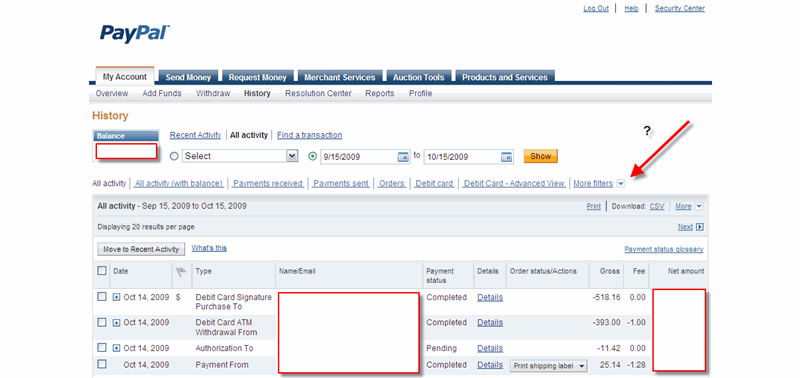
That's the problem I can't find the IPN History option:

~ jasmel : ** My Store** Using Contributions: Wallet Theme | Simple Google | Quantity Discounts | Godaddy | FAQ's | Confirm Email Address Entry | Admin login as customer | Newsletter Subscribe | CampaingMonitor

15 Oct 2009, 2:18 PM
#87
madmouse avatar

madmouse

New Zenner

Join Date:
May 2005
Location:
London, England
Posts:
22
Plugin Contributions:
0

Re: Help! Orders are NOT recording

jasmel:

That's the problem I can't find the IPN History option:

It's not where your arrow is! Closer to the top, you have the main tabs - My account, Send Money, etc. Below that Overview, Add funds, Withdraw then History - go to that drop down and you should see it.

Rob

15 Oct 2009, 2:30 PM
#88
jasmel avatar

jasmel

Zen Follower

Join Date:
Feb 2008
Location:
Washington State
Posts:
230
Plugin Contributions:
0

Re: Help! Orders are NOT recording

madmouse:

It's not where your arrow is! Closer to the top, you have the main tabs - My account, Send Money, etc. Below that Overview, Add funds, Withdraw then History - go to that drop down and you should see it.

Rob

I guess that is the problem the History link isn't a drop down. The screen shot is taken after clicking the "History" hyperlink. *Note the orange "History" heading on the page.

Wonder if my account is set up wrong. I have a business account with Websites Payment Pro.

hmmmm - looks like I will have to download the "Push" thing you installed.

~ jasmel : ** My Store** Using Contributions: Wallet Theme | Simple Google | Quantity Discounts | Godaddy | FAQ's | Confirm Email Address Entry | Admin login as customer | Newsletter Subscribe | CampaingMonitor

15 Oct 2009, 2:32 PM
#89
jasmel avatar

jasmel

Zen Follower

Join Date:
Feb 2008
Location:
Washington State
Posts:
230
Plugin Contributions:
0

Re: Help! Orders are NOT recording

got it! it was a Firefox issue. I loaded the same page in IE and see the javaScript drop down. Thanks!

~ jasmel : ** My Store** Using Contributions: Wallet Theme | Simple Google | Quantity Discounts | Godaddy | FAQ's | Confirm Email Address Entry | Admin login as customer | Newsletter Subscribe | CampaingMonitor

15 Oct 2009, 2:38 PM
#90
stubbdog avatar

stubbdog

New Zenner

Join Date:
Aug 2008
Posts:
11
Plugin Contributions:
0

Re: Help! Orders are NOT recording

Madmouse Rob,

I just downloaded that Push thing..

It seems simple to say copy all enclosed files to the root.. but I am easily confused so, just verifying..

The zip file that I downloaded had a folder called paypal_sessions_yadayadayada
Inside this folder there is a folder called Catalog (this is the level where the readme is)
Inside of Catalog are the folders Admin and Includes..

So, which level is it that I am copying to?

Am I copying the Catalog folder over?
or am I copying the items from the Admin and Includes into those folders?

Thanks for any help...

15 Oct 2009, 5:28 PM
#91
jasmel avatar

jasmel

Zen Follower

Join Date:
Feb 2008
Location:
Washington State
Posts:
230
Plugin Contributions:
0

Re: Help! Orders are NOT recording

stubbdog:

Madmouse Rob,

I just downloaded that Push thing..

So, which level is it that I am copying to?

Am I copying the Catalog folder over?
or am I copying the items from the Admin and Includes into those folders?

Thanks for any help...

First change the admin folder name to the name that you called your admin folder. (if you haven't renamed this you might be at risk later on)

Then copy the two folders ("admin", and includes) into your store folder (might be the root of your domain or domain/store/)

Make sure you edit the files as instructed (password etc...)

I just installed this and it works like a charm!

~ jasmel : ** My Store** Using Contributions: Wallet Theme | Simple Google | Quantity Discounts | Godaddy | FAQ's | Confirm Email Address Entry | Admin login as customer | Newsletter Subscribe | CampaingMonitor

15 Oct 2009, 5:42 PM
#92
drbyte avatar

drbyte

Sensei

Join Date:
Jan 2004
Posts:
63,513
Plugin Contributions:
176

Re: Help! Orders are NOT recording

jasmel:

Oh, as for the express checkout... I am a Website Payments Pro customer. If I went with the Express checkout option would I need to cancel the other?
If you're using Website Payments Pro on your store now, then you are also required to be using Express Checkout on your store too. (If you're only using Pro for the sake of Virtual Terminal, then that "requirement" doesn't apply.)

If you do enable Express Checkout on your store, you should go to the Standard/IPN module settings in your admin and click "Remove" to cause the Standard module to no longer be used.

There's nothing to "cancel" by going to Express Checkout.

.
Zen Cart - putting the dream of business ownership within reach of anyone!
Donate to: DrByte directly or to the Zen Cart team as a whole

Remember: Any code suggestions you see here are merely suggestions. You assume full responsibility for your use of any such suggestions, including any impact ANY alterations you make to your site may have on your PCI compliance.
Furthermore, any advice you see here about PCI matters is merely an opinion, and should not be relied upon as "official". Official PCI information should be obtained from the PCI Security Council directly or from one of their authorized Assessors.

16 Oct 2009, 5:39 PM
#93
ajeh avatar

ajeh

Oba-san

Join Date:
Sep 2003
Location:
Ohio
Posts:
62,757
Plugin Contributions:
1

Re: Help! Orders are NOT recording

v1.3.8 does not point to the /extras directory ... it is setup correctly ...

Linda McGrath
If you have to think ... you haven't been zenned ...

**Did YOU buy the Zen Cart Team a cup of coffee and a donut today? Just click here to support the Zen Cart Team!!**

Are you using the latest? Perhaps you've a problem that's fixed in the latest version: [Upgrade today!]
Officially PayPal-Certified! Just click here

Try our Zen Cart Recommended Services - Hosting, Payment and more ...
Signup for our Announcements Forums to stay up to date on important changes and updates!

29 Jun 2010, 4:40 PM
#94
crystal9189 avatar

crystal9189

New Zenner

Join Date:
Jun 2010
Posts:
3
Plugin Contributions:
0

Re: Help! Orders are NOT recording

Zencart Version: v1.3.9d
Database: Mysql 5.0

I've got the problem after I upgraded to v1.3.9d

It seems that there is no communication problem between paypal and my server.

These are the result after I run
http://www.lizfelice.com/ipn_main_handler.php

Nothing to process. Please return to home page.

http://www.lizfelice.com/extras/ipncheck.php

IPNCHECK.PHP - Version 1.3.9

CURL RESPONSE RECEIVED - Communications OKAYIPN TESTING - Response Received via CURL -- COMMUNICATIONS OKAY

IPN TESTING - Confirmation/Validation response with fsockopen(): FSOCKOPEN() RESPONSE RECEIVED - Communications OKAY
Default method likely to be used for communications is: CURL, with the fallback method being FSOCKOPEN if possible.Script finished.

The ipn log after transaction was made

Jun 29 2010 5:55 -- IPN PROCESSING INITIATED.
*** Originating IP: 66.211.170.66 notify.paypal.com

Jun 29 2010 5:55 -- Breakpoint: 0 - Initializing debugging.

Jun 29 2010 5:55 -- Breakpoint: Flag Status:
isECtransaction = 0
isDPtransaction = 0

Jun 29 2010 5:55 -- IPN INFO - POST VARS received (sorted):
Array
(
[business] => lxxxx@#####.com
[charset] => Big5
[custom] => zenid=pmtpe85jkrju4o1hpb7e80seu6
[first_name] => ##o
[handling_amount] => 0.00
[item_name] => LizFelice by DoubleBat Purchase
[item_number] => Store Receipt
[last_name] => ### ###
[mc_currency] => USD
[mc_gross] => 0.10
[notify_version] => 3.0
[payer_email] => en****@#####.com
[payer_id] => E8BRQ****
[payer_status] => verified
[payment_date] => 22:59:31 Jun 27, 2010 PDT
[payment_gross] => 0.10
[payment_status] => Pending
[payment_type] => instant
[pending_reason] => multi_currency
[protection_eligibility] => Ineligible
[quantity] => 1
[receiver_email] => lxxxx@#####.com
[receiver_id] => R4JZ**
[resend] => true
[residence_country] => HK
[shipping] => 0.00
[tax] => 0.00
[transaction_subject] => zenid=pmtpe*****4o1hpb7e80seu6
[txn_id] => 07L
8SM336
*
[txn_type] => web_accept
[verify_sign] => An5ns1*UdW4ErQK4qi4-uaymVbfJFEig9DYpPHhi
)

Jun 29 2010 5:55 -- IPN INFO - POST VARS to be sent back (unsorted) for validation (using CURL):
To: www.paypal.com:80
Array
(
[cmd] => _notify-validate
[handling_amount] => 0.00
[payer_id] => E8BRQ****
[shipping] => 0.00
[charset] => Big5
[payment_gross] => 0.10
[verify_sign] => An5ns1UdW4ErQK4qi4-uaymVbfJFEig9DYpPHhi
[item_name] => Li
****** Purchase
[pending_reason] => multi_currency
[txn_type] => web_accept
[receiver_id] => R4*******JZ**
[mc_currency] => USD
[transaction_subject] => zenid=pmtpe4o1hpb7e80seu6
[custom] => zenid=pmtpe85jkrju4o1hpb7e80seu6
[protection_eligibility] => Ineligible
[payer_status] => verified
[first_name] => ##
[mc_gross] => 0.10
[payment_date] => 22:59:31 Jun 27, 2010 PDT
[payment_status] => Pending
[quantity] => 1
[business] => lxxxx@#####.com
[item_number] => Store Receipt
[last_name] => ### ###
[txn_id] => 07L82718SM336471V
[resend] => true
[payment_type] => instant
[notify_version] => 3.0
[payer_email] => ad
***@#####.com
[receiver_email] => lxxxxx@#####.com
[tax] => 0.00
[residence_country] => HK
)

Jun 29 2010 5:55 -- CURL OPTS: Array
(
[10002] => https://www.paypal.com/cgi-bin/webscr
[47] => 1
[10015] => cmd=_notify-validate&handling_amount=0.00&payer_id=E8QEBRQDF3K5Y&shipping=0.00&charset=Big5&payment_gross=0.10&verify_sign=An5ns1Kso7MWUdW4ErQKJJJ4qi4-ABouaymVbALhr7fJFEig9DYpPHhi&item_name=L********+++Purchase&pending_reason=multi_currency&txn_type=web_accept&receiver_id=R4MEX37KCJZLG&mc_currency=USD&transaction_subject=zenid%3Dpmtpe85jkrju4o1hpb7e80seu6&custom=zenid%3Dpmtpe85jkrju4o1hpb7e80seu6&protection_eligibility=Ineligible&payer_status=verified&first_name=Lo&mc_gross=0.10&payment_date=22%3A59%3A31+Jun+27%2C+2010+PDT&payment_status=Pending&quantity=1&business=lxxxx%40#####.com&item_number=Store+Receipt&last_name=###+###&txn_id=07####18##33####V&resend=true&payment_type=instant&notify_version=3.0&payer_email=a**%40#####.com&receiver_email=lxxxx%40#####.com&tax=0.00&residence_country=HK
[13] => 45
[78] => 30
[41] => 0
[42] => 0
[52] => 0
[19913] => 1
[64] => 0
[81] => 2
[75] => 1
[74] => 1
[84] => 2
[10018] => Zen Cart(tm) - IPN Postback
)

Jun 29 2010 5:55 -- CURL response: VERIFIED

Jun 29 2010 5:55 -- IPN INFO (cl) - Confirmation/Validation response VERIFIED

Jun 29 2010 5:55 -- Breakpoint: 1 - Collected data from PayPal notification

Jun 29 2010 5:55 -- IPN INFO :: Transaction email details.
From IPN = lxxxxw@####.com | lxxxxw@####.com
From CONFIG = lxxxxw@####.com

Jun 29 2010 5:55 -- Breakpoint: 2 - Validated transaction components

Jun 29 2010 5:55 -- Breakpoint: 3 - Communication method verified

Jun 29 2010 5:55 -- IPN NOTICE :: Found pending-multicurrency record in database

Jun 29 2010 5:55 -- Breakpoint: 4 - Details: txn_type=pending-multicurrency ordersID = 0 IPN_id=61

Relevant data from POST:
txn_type = pending-multicurrency
parent_txn_id = None
txn_id = ####271###336####

Jun 29 2010 5:55 -- IPN NOTICE :: IPN pausing: waiting for PDT to process. Sleeping 10 seconds ...

Jun 29 2010 5:55 -- Breakpoint: 5 - Transaction type (txn_type) = pending-multicurrency [parentLookup=pending-multicurrency]

Jun 29 2010 5:55 -- IPN NOTICE :: pending-multicurrency transaction -- inserting initial record for reference purposes

I can receive a notification from Paypal but the new order was not recorded/updated either in admin or in the database.

I can see the following in Customer -> Paypal IPN

Order # PayPal # Transaction Type Payment Status Amount Action
0 62 pending-multicurrency

### ### Pending

Parent Trans ID:
Trans ID:07L8SM336 USD 0.10

Seems that Paypal can communicate to my server but the new order is not recorded.

Anyone know how to fix my problem?

Thanks in advance.