Zen Cart Logo
Forums / Addon Templates / Apple Zen Support Thread

Apple Zen Support Thread

Views: 855,525

Results 2,661 to 2,680 of 3,042
22 May 2009, 1:43 PM
#2661
jettrue avatar

jettrue

Totally Zenned

Join Date:
Jan 2005
Location:
USA, St. Louis
Posts:
3,651
Plugin Contributions:
5

Apple Zen Support Thread

colortheworld:

having difficulty with this one. I created a new background image for site-bg.gif. I renamed it as such, yet when I went to save the file -- the background disappeared as if it was designed to do so. what gives?

I need to see a link please?

Was the image originally a .gif? or a .jpg? if its a jpg, you can't rename it to gif.

22 May 2009, 1:46 PM
#2662
jettrue avatar

jettrue

Totally Zenned

Join Date:
Jan 2005
Location:
USA, St. Louis
Posts:
3,651
Plugin Contributions:
5

Re: Apple Zen Support Thread

NodRoss:

[/IMG]

so, this picture explains Everything :D

1.)That's in includes/templates/YOUR_TEMPLATE/common/tpl_header.php

  1. turn off the breadcrumb links in your admin, under "Configuration", "Layout Settings"
25 May 2009, 5:17 PM
#2663
jaaxx avatar

jaaxx

New Zenner

Join Date:
Feb 2009
Posts:
5
Plugin Contributions:
0

Re: Apple Zen Support Thread

OK, I'm stumped. I got distracted while updating some config items and now my drop_menu appears at the top of the header over the search box, etc. But only when a customer is not logged in.

When logged in, the drop menu appears in the correct position under the Categories - Tab Menu.

I have gone over every config option line by line and cannot possible see where things are awry. I figured it would be a customer authorization setting, but I tried all those. Any ideas?

http://www.juicyliquid.com

26 May 2009, 7:01 AM
#2664
jaaxx avatar

jaaxx

New Zenner

Join Date:
Feb 2009
Posts:
5
Plugin Contributions:
0

Re: Apple Zen Support Thread

Nevermind. Problem with Cart Sidebox with Free Shipping Qualifier and Checkout Button mod was causing the problem. Still don't know what the conflict is, but I've at least solved the problem for now.

31 May 2009, 3:09 AM
#2665
windswift avatar

windswift

New Zenner

Join Date:
Mar 2009
Posts:
15
Plugin Contributions:
0

Re: Apple Zen Support Thread

Does anyone knows how to make a transparence drop down menu?
like the link below.
http://www.nahidfashions.com/boutique/
which I can see the images/words behind the drop down menu.

31 May 2009, 10:38 AM
#2666
tagyourbaby avatar

tagyourbaby

New Zenner

Join Date:
Feb 2008
Location:
Auckland, NZ
Posts:
53
Plugin Contributions:
0

Re: Apple Zen Support Thread

Hi this is probably really simple but my "about us" link isnt working, its just coming up with an error.

http://www.exquisitebaby.co.nz/shop

How do i fix it?

1 Jun 2009, 12:21 AM
#2667
tagyourbaby avatar

tagyourbaby

New Zenner

Join Date:
Feb 2008
Location:
Auckland, NZ
Posts:
53
Plugin Contributions:
0

Re: Apple Zen Support Thread

Fixed it after finding some info in this thread :) Thanks :D

1 Jun 2009, 12:22 AM
#2668
jettrue avatar

jettrue

Totally Zenned

Join Date:
Jan 2005
Location:
USA, St. Louis
Posts:
3,651
Plugin Contributions:
5

Re: Apple Zen Support Thread

Tagyourbaby:

Hi this is probably really simple but my "about us" link isnt working, its just coming up with an error.

http://www.exquisitebaby.co.nz/shop

How do i fix it?

Are you using the latest version of the template? Make sure all files have been uploaded to their correct spots.

1 Jun 2009, 12:23 AM
#2669
jettrue avatar

jettrue

Totally Zenned

Join Date:
Jan 2005
Location:
USA, St. Louis
Posts:
3,651
Plugin Contributions:
5

Re: Apple Zen Support Thread

windswift:

Does anyone knows how to make a transparence drop down menu?
like the link below.
http://www.nahidfashions.com/boutique/
which I can see the images/words behind the drop down menu.

It looks like they are using a semi-transparent .png image to do that.

1 Jun 2009, 3:44 AM
#2670
windswift avatar

windswift

New Zenner

Join Date:
Mar 2009
Posts:
15
Plugin Contributions:
0

Re: Apple Zen Support Thread

jettrue:

It looks like they are using a semi-transparent .png image to do that.

Thanks for your reply, i really like your template. I thought it was a part of your template, it looks really nice. anyway, at least I know what it is. thank you again. I hope I can know how to do this.

1 Jun 2009, 3:52 AM
#2671
windswift avatar

windswift

New Zenner

Join Date:
Mar 2009
Posts:
15
Plugin Contributions:
0

Re: Apple Zen Support Thread

yes, your right, they are semi-transparent images. as I googled, only firefox can display the semi transparent images. ie can't. so bad.

1 Jun 2009, 1:59 PM
#2672
charals avatar

charals

New Zenner

Join Date:
Jun 2009
Posts:
28
Plugin Contributions:
0

Re: Apple Zen Support Thread

I am really new to Zencart. I like the Apple Zen design the best. I noticed after I downloaded the latest version of apple zen (horizontal menus) that the "Discount Coupons" drop down menu was misspelled "Discout Coupons". So I tried to find which php file and where it is located so that I could correct it. Thanks in advance if you could direct me on this one.

1 Jun 2009, 2:37 PM
#2673
charals avatar

charals

New Zenner

Join Date:
Jun 2009
Posts:
28
Plugin Contributions:
0

Re: Apple Zen Support Thread

charals:

I am really new to Zencart. I like the Apple Zen design the best. I noticed after I downloaded the latest version of apple zen (horizontal menus) that the "Discount Coupons" drop down menu was misspelled "Discout Coupons". So I tried to find which php file and where it is located so that I could correct it. Thanks in advance if you could direct me on this one.

I realize that I am so new that this issue has been already taken care of... I did not have the latest update - now I am using ver 2.6. But I did manage to sift through and found the area of interest in the headermenu.php file.

I apologize for jumping the gun, I will do more homework next time.. I just thought I was stumped last night.

Thanks

4 Jun 2009, 1:55 PM
#2674
nickjre avatar

nickjre

New Zenner

Join Date:
Jul 2005
Posts:
84
Plugin Contributions:
0

Re: Apple Zen Support Thread

I have a problem, for some reason one of the flyouts automatically rolls out with out being hovered over

http://www.jreperformanceparts.com/catalog

Hover to Gas,

Then hover to GM,

Then hover to Chevrolet.

Any ideas why it's doing that?

Thanks,
Nick

5 Jun 2009, 3:21 AM
#2675
ommannette avatar

ommannette

New Zenner

Join Date:
Apr 2009
Posts:
9
Plugin Contributions:
0

Re: Apple Zen Support Thread

Hi..,
I am using your Apple Zen Template (love it!) and I would like some help with two issues.

  1. When I go to the login page.., the header moves to the left (in both IE and Firefox.) (The EZpages bar is out of line on firefox as well, but not IE)

  2. How do I remove the "read review, tell a friend, ask a question from the bottom of the products page?

I would not mind keeping them, but I have not figured out how to get the images to show. Also do not know if I have to design a "ask a question" page , etc. or is it somewhere on zencart already?

my site is
http://www.shop.freelancefoodie.com

Thanks!

5 Jun 2009, 2:09 PM
#2676
ommannette avatar

ommannette

New Zenner

Join Date:
Apr 2009
Posts:
9
Plugin Contributions:
0

Re: Apple Zen Support Thread

Ok , I figured out the header issue (I had to remove the "/*" from line 65, where the instructions for the narrow header is)..
But I still need help with the products page.
If anyone can help me , I would appreciate it.

7 Jun 2009, 9:19 AM
#2677
gfstrading avatar

gfstrading

New Zenner

Join Date:
Jun 2009
Posts:
2
Plugin Contributions:
0

Re: Apple Zen Support Thread

Hi, I prefer Apple Zen and have been using this template since Dec 2007, so the version should be the oldest one.

I am sorry if this has been answered before, trying to search but couldn't find...

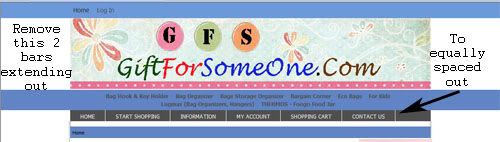
  1. How do I remove the 2 blue bars extending out from the main menu?

  2. How do I make the menu bar equally spaced for the 6 headers. i.e "Home", "Start Shoppping. "Information"...

  3. How do I add a background pic to the page.

Pls pardon me as I am really not technically skill in this area and have been struggling for some time.
MTIA.

7 Jun 2009, 5:23 PM
#2678
windswift avatar

windswift

New Zenner

Join Date:
Mar 2009
Posts:
15
Plugin Contributions:
0

Re: Apple Zen Support Thread

GFSTrading:

Hi, I prefer Apple Zen and have been using this template since Dec 2007, so the version should be the oldest one.

I am sorry if this has been answered before, trying to search but couldn't find...

  1. How do I remove the 2 blue bars extending out from the main menu?

  2. How do I make the menu bar equally spaced for the 6 headers. i.e "Home", "Start Shoppping. "Information"...

  3. How do I add a background pic to the page.

Pls pardon me as I am really not technically skill in this area and have been struggling for some time.
MTIA.

1, blue strip below header
admin->config->Layout setting->categories tabs turn off
blue strip above header
add this to your css file
#navMain {display:none}
2, the menu bar should be equal, you can check it under
stylesheet_header_menu.css, should be 16.67%for each section
3, simply add the background-image to your css file.

7 Jun 2009, 5:27 PM
#2679
windswift avatar

windswift

New Zenner

Join Date:
Mar 2009
Posts:
15
Plugin Contributions:
0

Re: Apple Zen Support Thread

sry, the first one, if you only want to remove the extension out side your main page, go to stylesheet, change the color under #wrapper.
you can find the location by search the color code.