New Zenner
- Join Date:
- Mar 2009
- Posts:
- 15
- Plugin Contributions:
- 0
Apple Zen Support Thread
ok,I found it, fixed navigation.
Views: 855,521
New Zenner
ok,I found it, fixed navigation.
Totally Zenned
NickJRE:
I have a problem, for some reason one of the flyouts automatically rolls out with out being hovered over
http://www.jreperformanceparts.com/catalog
Hover to Gas,
Then hover to GM,
Then hover to Chevrolet.
Any ideas why it's doing that?
Thanks,
Nick
It's a known bug, for menus that have too many subcategories. Unfortunately the answer is either you live with it, or you uninstall it, sorry, I can't figure it out!
Totally Zenned
ommannette:
Ok , I figured out the header issue (I had to remove the "/*" from line 65, where the instructions for the narrow header is)..
But I still need help with the products page.
If anyone can help me , I would appreciate it.
Your site has a lot of errors.
For one, you seem to have this twice:
<div class="centerColumn" id="indexDefault">Go to:
http://validator.w3.org/check?verbose=1&uri=http%3A%2F%2Fwww.shop.freelancefoodie.com%2F
And try to figure out some of your errors. If you have too much trouble figuring out the errors, I'd suggest you start fresh and re-install the template.
Totally Zenned
GFSTrading:
Hi, I prefer Apple Zen and have been using this template since Dec 2007, so the version should be the oldest one.
I am sorry if this has been answered before, trying to search but couldn't find...
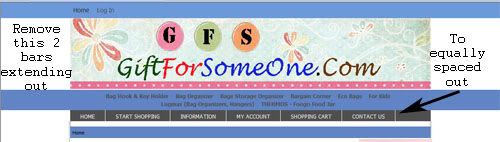
How do I remove the 2 blue bars extending out from the main menu?
How do I make the menu bar equally spaced for the 6 headers. i.e "Home", "Start Shoppping. "Information"...
How do I add a background pic to the page.
Pls pardon me as I am really not technically skill in this area and have been struggling for some time.
MTIA.
Do I understand correctly, that you are using an old version of the template? Please install the newest version first.
New Zenner
jettrue:
Do I understand correctly, that you are using an old version of the template? Please install the newest version first.
Hi, I am sorry but to be frank, I will not know exactly how to do it...:blush:
This current one was passed down to me by my friend who can't help me now...:cry:
Actually the whole site is working well but just want to beautify it...
If you can help me, I will really appreciate.
New Zenner
jettrue:
You can remove the HOME LOGIN from the header in includes/templates/apple_zen/common/tpl_header.php.
Can you give a bit more detail on how to actually remove this? I am not to sure which part of the code controls this, do I just comment something out or delete something entirely? I would really like to know as it seems duplicated with lower menus the way I have my site configured so far; but I don't want to mess up your great template by doing this without your guidance.
Thanks Charals
New Zenner
jettrue:
Your site has a lot of errors.
For one, you seem to have this twice:
<div class="centerColumn" id="indexDefault">Go to:
http://validator.w3.org/check?verbose=1&uri=http%3A%2F%2Fwww.shop.freelancefoodie.com%2FAnd try to figure out some of your errors. If you have too much trouble figuring out the errors, I'd suggest you start fresh and re-install the template.
I would just like to remove the "read reviews", "ask a question" "tell a friend" etc. from the bottom of the products page.., can you help me with that?
New Zenner
I saw the errors and if I were to code my own page, I could probably find the errors and fix them, however, I don't know where to find these pages on zencart. I don't suppose you could tell me that could you? I see the errors, but where is the actual page to fix them?
Thank you for your help with this..,
Totally Zenned
ommannette:
I saw the errors and if I were to code my own page, I could probably find the errors and fix them, however, I don't know where to find these pages on zencart. I don't suppose you could tell me that could you? I see the errors, but where is the actual page to fix them?
Thank you for your help with this..,
The only way for me to tell you how to fix the errors, is for me to do it myself. So then my advice is for you to start fresh with the template.
As far as the things you want to remove from the product page, you do all that in your admin, under "Catalog", "Product Types", "Layout Settings"
Totally Zenned
charals:
Can you give a bit more detail on how to actually remove this? I am not to sure which part of the code controls this, do I just comment something out or delete something entirely? I would really like to know as it seems duplicated with lower menus the way I have my site configured so far; but I don't want to mess up your great template by doing this without your guidance.
Thanks Charals
Try removing this portion:
```
If you keep a copy before you make changes, you don't need to worry about trying to do things yourself.
Totally Zenned
GFSTrading:
Hi, I am sorry but to be frank, I will not know exactly how to do it...:blush:
This current one was passed down to me by my friend who can't help me now...:cry:Actually the whole site is working well but just want to beautify it...
If you can help me, I will really appreciate.
Email me at [email protected]
New Zenner
jettrue:
The only way for me to tell you how to fix the errors, is for me to do it myself. So then my advice is for you to start fresh with the template.
As far as the things you want to remove from the product page, you do all that in your admin, under "Catalog", "Product Types", "Layout Settings"
I can fix the errors if I knew where the html or php files were that they are in. I just d/l the apple zen file. The "read review" tell a friend, etc. appeared when I d/l the apple zen, this is why I would like to know where to go to get it off.
Thanks for your help with this..,
Totally Zenned
ommannette:
I can fix the errors if I knew where the html or php files were that they are in. I just d/l the apple zen file. The "read review" tell a friend, etc. appeared when I d/l the apple zen, this is why I would like to know where to go to get it off.
Thanks for your help with this..,
I told you how to remove them:
.... in your admin, under "Catalog", "Product Types", "Layout Settings"
New Zenner
<div id="navMainLinks"> <ul class="back"> <li><?php echo '<a href="' . HTTP_SERVER . DIR_WS_CATALOG . '">'; ?><?php echo HEADER_TITLE_CATALOG; ?></a></li> <?php if ($_SESSION['customer_id']) { ?> <li><a href="<?php echo zen_href_link(FILENAME_LOGOFF, '', 'SSL'); ?>"><?php echo HEADER_TITLE_LOGOFF; ?></a></li> <li><a href="<?php echo zen_href_link(FILENAME_ACCOUNT, '', 'SSL'); ?>"><?php echo HEADER_TITLE_MY_ACCOUNT; ?></a></li> <?php } else { if (STORE_STATUS == '0') { ?> <li><a href="<?php echo zen_href_link(FILENAME_LOGIN, '', 'SSL'); ?>"><?php echo HEADER_TITLE_LOGIN; ?></a></li> <?php } } ?> <?php if ($_SESSION['cart']->count_contents() != 0) { ?> <li><a href="<?php echo zen_href_link(FILENAME_SHOPPING_CART, '', 'NONSSL'); ?>"><?php echo HEADER_TITLE_CART_CONTENTS; ?></a></li> <li><a href="<?php echo zen_href_link(FILENAME_CHECKOUT_SHIPPING, '', 'SSL'); ?>"><?php echo HEADER_TITLE_CHECKOUT; ?></a></li> <?php }?> </ul> </div> ``` > > If you keep a copy before you make changes, you don't need to worry about trying to do things yourself.jettrue:
Try removing this portion:
```
Ok thankyou, you are so very helpful., that worked out really well for me. Ihave taken your advice and made a backup before I change too much. Another question I have is to make the logo.gif go all the way across the screen. I have already removed the text that presided to the right of it. Where and how can this be done? Thanks again! Charals
New Zenner
Thanks so much for sharing the post.
simulation credit auto
New Zenner
Thanks for your sharing
simulation credit auto:clap:
Totally Zenned
charals:
Ok thankyou, you are so very helpful., that worked out really well for me. Ihave taken your advice and made a backup before I change too much. Another question I have is to make the logo.gif go all the way across the screen. I have already removed the text that presided to the right of it. Where and how can this be done? Thanks again! Charals
Read the readme. :)
New Zenner
Ok I will do, sorry for missing that Jade, I appreciate your guidance. Your Template is a lifesaver!
Thanks Charals
Totally Zenned
I'm building a new zen cart using my modified version of your (Fab-o!) Apple Zen as the template, altering colors and whatnot after-the-fact. Everything is moving along swimmingly but I do have a bit of a quandary. If I view this new site in IE7 there is a light-blue, horizontal bar immediately below the logo that I would like to remove. However, it does not appear in FF and therefore I can't see it in my FF developer tools to name it and remove it. :no:
Can you tell me what that light blue bar is and how to best remove it?
Thank you!
Totally Zenned
MeltDown:
I'm building a new zen cart using my modified version of your (Fab-o!) Apple Zen as the template, altering colors and whatnot after-the-fact. Everything is moving along swimmingly but I do have a bit of a quandary. If I view this new site in IE7 there is a light-blue, horizontal bar immediately below the logo that I would like to remove. However, it does not appear in FF and therefore I can't see it in my FF developer tools to name it and remove it. :no:
Can you tell me what that light blue bar is and how to best remove it?
Thank you!
Turn off the ezpages header bar under "Configuration", "Ezpages Settings"
Fields marked required must be completed.
Tell staff why this post should be reviewed.